
Viewing the Folder Sync job list
A Folder Sync folder synchronization event runs a separate synchronization job for each selected mailbox that it processes. The Folder Sync job list presents a dynamic record of all the Folder Sync jobs that have run or that are currently executing, with details about each job.
To view the Folder Sync job list
-
In the left pane of the ArchiveTools Management Console, expand the Archive Accelerator node.
-
Select Job List.
The job list appears in the main pane.
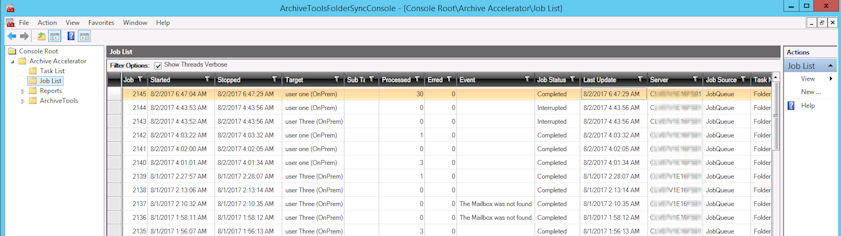
You can sort and filter the contents of the job list as follows:
-
To sort the list on a column, click the column heading. To reverse the sort order, click the column heading again.
-
To filter the content that is included in a column, click the filter icon in the column heading and in the Filter dialog specify the filter details. The available filter options depend on the column that is selected.
To remove a filter from a column, click the filter icon in the column heading, and then click Clear Filter.
Related information