
About Google account synchronization with CloudLink
CloudLink simplifies Arctera Insight Archiving archive account provisioning by synchronizing directory user accounts with Arctera Insight Archiving. CloudLink can also send welcome email messages to users that it has synchronized, informing them of their Insight Personal Archive archive and how to access it.
CloudLink now includes a Google account synchronization feature, "Google Sync". This feature is typically for use in environments where you manage Google G Suite Enterprise users and groups from Microsoft Active Directory, and where you use the Google Cloud Directory Sync tool (GCDS) to synchronize the Active Directory users and groups to your Google G Suite domain. For more information about GCDS see the following article from Google's G Suite Administrator Help: https://support.google.com/a/answer/106368?hl=en.
With CloudLink you can create a Google Sync task to synchronize to Arctera Insight Archiving the same set of Active Directory users and groups that you have synchronized to G Suite using GCDS.
Figure: Active Directory account synchronization with GCDS and CloudLink
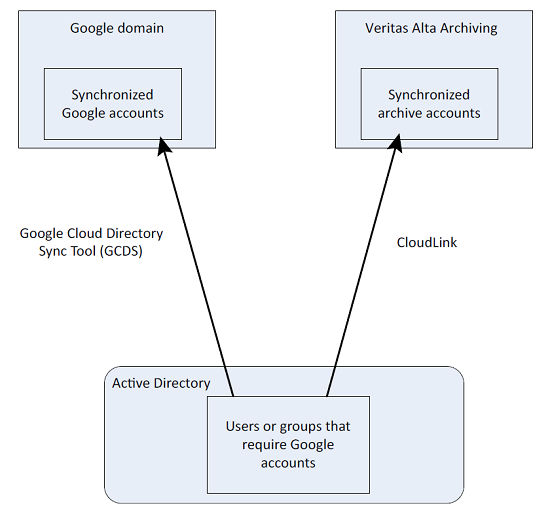
Every time you run the GCDS tool to synchronize Active Directory users to G Suite, you should aim to run a CloudLink Google Sync task to perform an equivalent synchronization to Arctera Insight Archiving. You should coordinate the runs of the GCDS tool and the CloudLink Google Sync task, so that the Arctera Insight Archiving archive accounts keep in step with the Google accounts.
Related information