
Changing your message view
By default, the message list in Personal.cloud displays all your messages archived using Enterprise Vault.cloud. You can change your message view to display only incoming or outgoing archived messages.
To change your message view
-
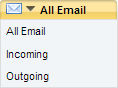
Click the All Email tab that is located above the message list.
-
Select one of the following options:
All Email Select to display all archived messages. Incoming Select to only display archived messages you received. Outgoing Select to only display archived messages you sent.
More Information
Related information