
About the Folder Sync Mailbox Report
The ArchiveTools Management Console can display a ArchiveTools Folder Sync Mailbox Report, which shows the status of each mailbox that Folder Sync has processed. The report includes a list of the folders that have been synchronized for each mailbox. You can click a folder in the list to view a child report, the ArchiveTools Folder Sync Folder Report. The Folder Report shows details of the emails that Folder Sync has processed for the selected folder.
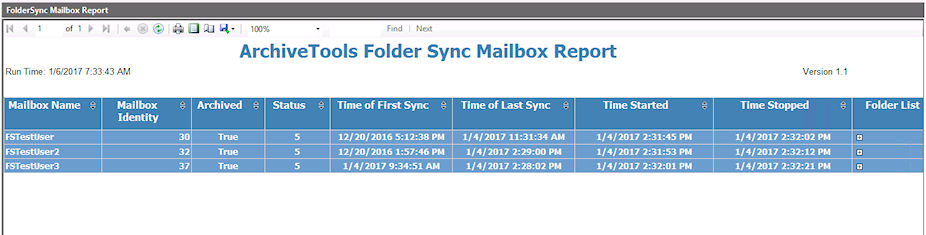
Table: Contents of the ArchiveTools Folder Sync Mailbox Report lists the information that the Folder Sync Mailbox Report includes.
Related information
Table: Contents of the ArchiveTools Folder Sync Mailbox Report
| Column heading | Description |
|---|---|
| Mailbox name | The display name of the mailbox for which information is provided. |
| Mailbox Identity | An integer that identifies this mailbox. |
| Archived | True : Folder Sync has established that a provisioned account exists in Enterprise Vault.cloud. |
| False : Folder Sync has been unable to identify a provisioned account exists in Enterprise Vault.cloud. | |
| Status | A code that indicates the folder synchronization status, as follows\: |
| - 1 - To be started. Folder synchronization has not run. | |
| - 2 - Started. Folder synchronization is in progress. | |
| - 3 - Stopped. Item Synch task stopped while folder synchronizations were in progress. | |
| - 4 - Completed. Folder synchronization finished successfully. | |
| - 5 - Erred. An error occurred during processing. See the Event log column of the Folder Sync mailbox database entry for details. See Checking the Folder Sync synchronization status from the ArchiveTools Management Console . | |
| - 6 - Deleted. Unable to resolve the mailbox distinguished name in Active Directory. | |
| - 0 - To be synchronized. This status may occur if the Item Synch task is interrupted while synchronizing the Folder Sync database with Active Directory. | |
| Time of First Sync | The date and time when the first successful synchronization of the mailbox completed. |
| Time of Last Sync | The date and time when the most recent successful synchronization of the mailbox completed. |
| Time Started | The date and time when the most recent synchronization attempt started. |
| Time Stopped | The date and time when the most recent synchronization attempt finished. |
| Folder List | Click the Expand icon to see a list of folders that Folder Sync processed in the last synchronization. |
| Click any folder in the list to view a ArchiveTools Folder Sync Folder Report for the folder. The Folder Report lists details of the items that Folder Sync processed for the selected folder. | |
| To return to the parent mailbox report, click the left arrow button above the folder report's title in the main pane. |
More Information