
Generating billing report
To generate a billing report
-
In the left navigation pane, select Customer Service>Reseller Portal.
A list of available resellers appears.
-
On the Reseller Portal Viewpage, clickBilling Report.
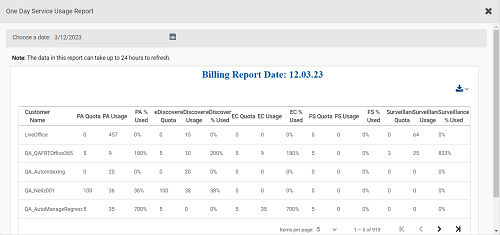
The application generates a reseller wise one day service usage report as on previous date as shown in the sample image below.
-
To get the one-day service usage report, click the Calendaricon, and select the date. Then, clickApply.
-
Click the Download icon to download this report.
Related information