
Viewing the All Mailboxes table
The All Mailboxes table provides information on the Folder Sync synchronization status for all the mailboxes that it has been directed to synchronize.
To view the All Mailboxes table
-
In the left pane of the ArchiveTools Management Console, expand the Archive Accelerator node.
-
Expand the ArchiveTools node and select All Mailboxes.
The All Mailboxes table appears in the main pane:
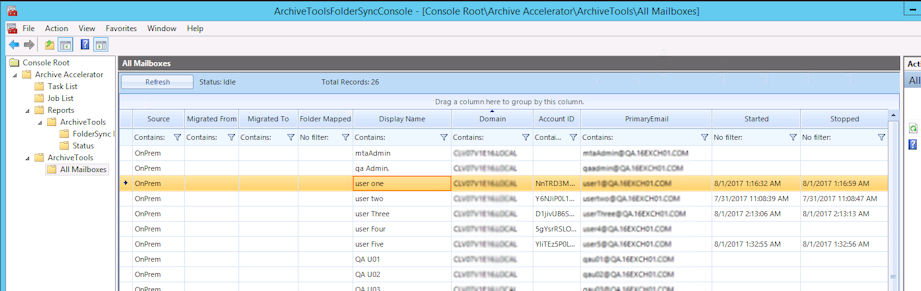
Note: ClickRefreshto refresh the table contents as required. The ArchiveTools Management Console does not update the table automatically.
You can sort, filter, and group the values in this table as follows:
-
To sort the contents by a particular column, click the column heading.
-
To filter the content of any column, click to the left of the filter icon in the required column, and type the text on which you want to filter.
-
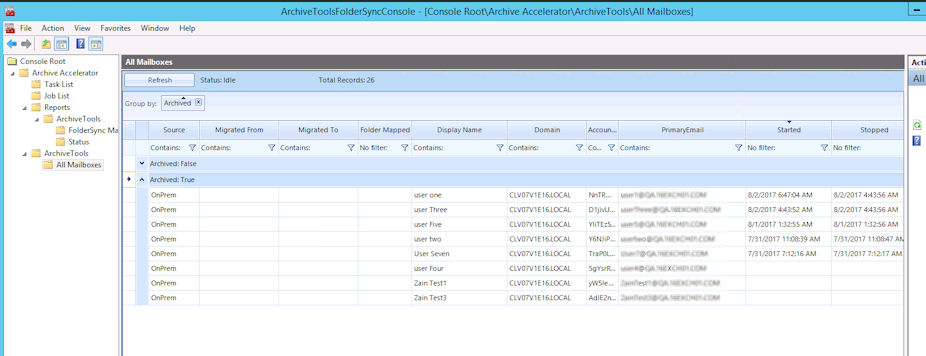
To group the content according to the values in a particular column, drag the column heading to the area above the table headings row.
The following example shows the table, grouped by the values in the Archived column:
Related information