
Logging in
To access your archived messages, you can access Insight Personal Archive on your mobile device using your Arctera Insight Archiving credentials.
To log in
-
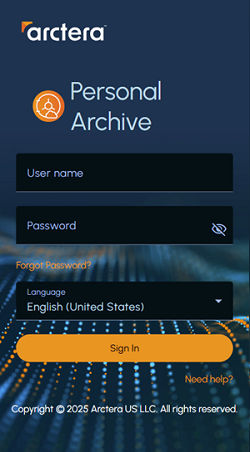
On a supported mobile device, open a supported mobile browser and enter the Insight Personal Archive Mobile Web Access URL. The authentication screen appears.
Note : If you do not have the URL, contact your system administrator.
-
On the authentication screen, enter your Arctera Insight Archiving username and password.
Click the password visibility icon to toggle between showing and hiding the password, if required.
-
To change the language for the sign-in screen, select a new language from the Languagedrop-down list. By default, the English language is selected.Note : The selected language applies only to the sign-in screen. If required, you can change the language for the entire application interface after signing in. See Setting the language for the entire application interface.
-
Click Sign In.
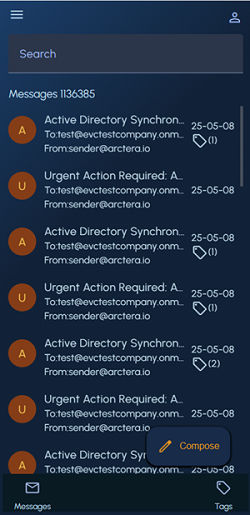
The mobile web access interface appears as shown in the sample image below.
For more information, See User interface components.
Related information