
About the Folder Sync Status Report
The ArchiveTools Management Console includes a ArchiveTools Folder Sync Status Report which shows information about the status of processing in the last 24 hours for the mailboxes that are selected for Folder Sync processing.
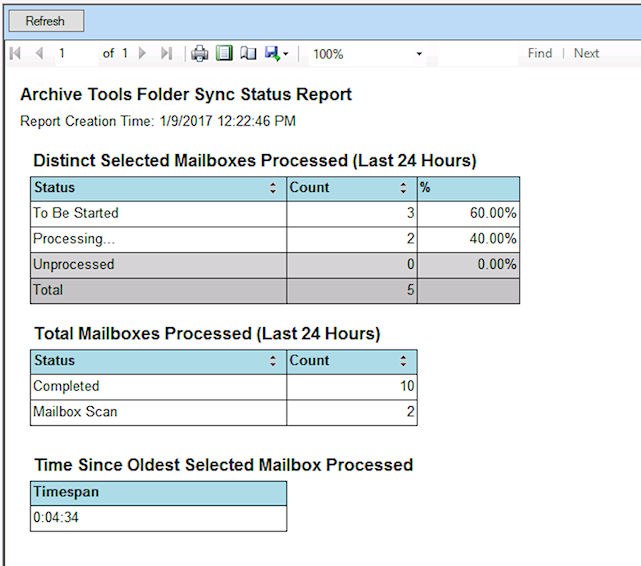
Table: Contents of the ArchiveTools Folder Sync Status Report lists the information that the Folder Sync Status Report includes.
Related information
Table: Contents of the ArchiveTools Folder Sync Status Report
| Section | Description |
|---|---|
| Distinct Selected Mailboxes Processed (Last 24 Hours) | Of the mailboxes that were selected for Folder Sync processing\: |
| The count for processed, completed, started, erred, and unprocessed individual mailboxes in the last 24 hours. | |
| Note: If the same mailbox was processed multiple times within the 24-hour period, the mailbox is countedonly oncein these figures. | |
| The mailbox numbers are shown both as a count and as a percentage of the total. | |
| Total Mailboxes Processed (Last 24 Hours) | Of the mailboxes that were selected for Folder Sync processing\: |
| The total count for processed, completed, started, erred, and unprocessed mailboxes in the last 24 hours. | |
| Note: If the same mailbox was processed multiple times within the 24-hour period, the mailbox is countedeach timein these figures. | |
| Time Since Oldest Selected Mailbox Processed | Of the mailboxes that were selected for Folder Sync processing\: |
| The longest time that has elapsed since Folder Sync began processing any individual mailbox. | |
| If the time is under 24 hours, the format of the value is Hours : Minutes : Seconds (HH:MM:SS) | |
| If the time is greater than 24 hours, the format of the value is Days : Hours : Minutes : Seconds (D:HH:MM:SS) | |
| Assuming that at least one complete folder synchronization has completed, this time provides an indicator of how long Folder Sync took to process all of the selected mailboxes. |
More Information