
Sharing exports with the external reviewers
Discovery administrators can share exported emails batch within that case with the external reviewers during the case review process. External reviewers can access the shared export batches from the Batch Process tab when the shared export is successful.
This feature is available only when the Download Export permission is enabled for the Discovery Administrator built-in role. For information on how to enable or disable this feature, see Editing the built-in administrator roles in the Enterprise Vault.cloud Archive Administration Help.
To share the exported emails batch
-
Navigate to the Casein eDiscovery and conduct a search usingNew Search.
-
If required, select check box for one or more emails.
-
Click Export, and then select an export option.
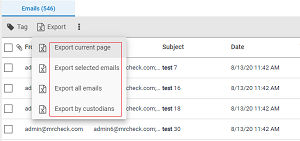
-
Enter the required information in the Export Options dialog. Review the following table for more information.
Message Format Select one of the following file formats from the drop-down menu\: - EML - NSF - PST - EML with EDRM - Msg with EDRM - PST with EDRM Warning: For Clearwell and FTI-Ringtail, do not use export options when exporting emails from the Investigations tab. These options are used for the discovery process and should only be available to export emails from theE-Discoverytab. Include Journaling Envelope Select this option to include journaling envelopes, which contain information about email recipients, such as distribution lists. Enable AES-256 Encryption Select this option to enable AES-256 encryption. Export Name Enter a name for the export file. Export Password Enter an access password for the export file. The password is required to open the export file after it is downloaded to your computer. Confirm Password Enter your export password again to confirm. Share Export Click this option to load the list of external reviewers to share export. Note: This list only displays the external reviewers who are added as reviewers for that case. -
Click Export Items.
-
To review the export status, expand the Batch Processes node and select Exports.>Note: Follow your company's security guidelines while manually sharing the export password between Advanced eDiscovery administrators and external reviewers. After you share the exports with the external reviewer, Discovery administrator needs to enable the external administrator to see the export. Discovery administrator must enable theDownload Shared Exportprivilege (under case reviewers) for the external reviewer. This step is done while creating/editing a case. After Discovery administrator assigns this privilege to the external reviewer, external reviewers can view the shared exports from the admin.Note: If discovery admin revokes the permission forDownload Shared Export, then the external reviewer cannot access the shared exports.
Related information