
Using a keywords-based exclusion policy condition
To use a keywords-based exclusion policy condition
-
Click the Exclude Match check box.
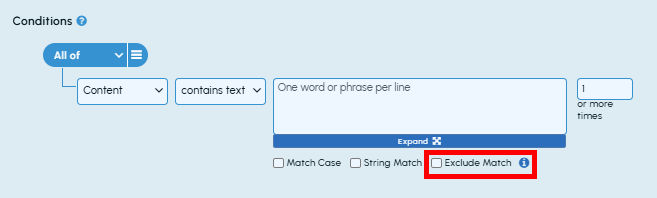
The new input field for defining exclusion terms is displayed.
-
In the inclusion terms field, enter the keywords, phrases, or regular expression that you want to include while evaluating the policy condition criteria. In the exclusion terms field, define the keywords or phrases that you want to exclude while evaluating the policy condition criteria.Note: Use only single word, phrase, or regular expression per line in both the fields as shown in the sample image below.
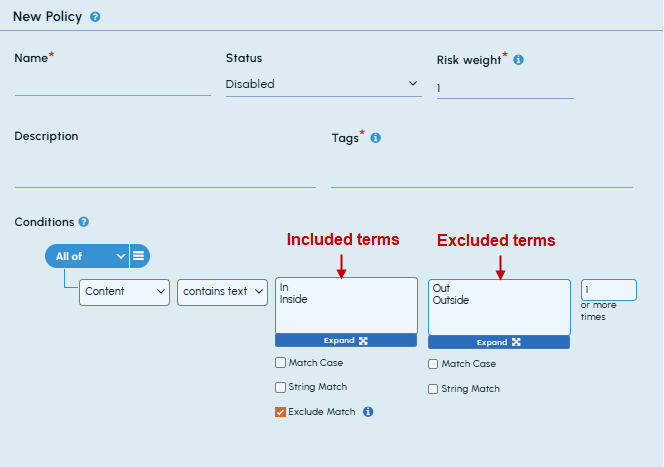
For more information about supported types of regular expression syntax, See Regular expression syntax.
-
If required, select the Match Caseand/orString Match check boxes for both input fields.
-
Specify the minimum count value in the last input field that applies to the number of matches in the document, and not to the number of excluded matches.
Below is a scenario to understand the concept in detail.
Test data - "Admin: There is a spoofing activity detected. Bob: Can you help me locate a spoofed account for spoofed email account?"
If you do not use the Exclude Match option, the application provides a hit on spoofing and spoofed (two occurrences).

However, if you use the Exclude Match option, let's understand how the terms get excluded.
Step 1: The first hit which is on spoofing. The application looks in both the directions (forward and backward) by 22 characters proximity. Application can not find any exclusion term, therefore, the termspoofing will be a match.

Step 2: The next hit will be the term spoofed. The application looks for exclusion terms in both the directions from the termspoofedby 22 characters proximity. Application can not find any exclusion term, therefore, the termspoofed will be a match.

Step 3: The next hit will again be the term spoofed. The application looks for exclusion terms in both directions from the termspoofedby 22 characters proximity. The application finds an exclusion termspoofed email account in the forward direction. Therefore, application ignores the term and do not consider it as a match.

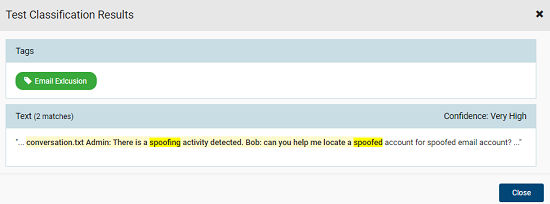
In the Test Classification Results section, you get only one match for the term spoofingand another match for the termspoofedterms. However, the match for the termsspoofed email account is excluded. The match result appears as shown in the sample image below:
Related information