
Selecting the actions for a Google Sync task to perform
The Select Action(s) step of the CloudLink Task Manager Wizard lets you choose the actions that the task performs.
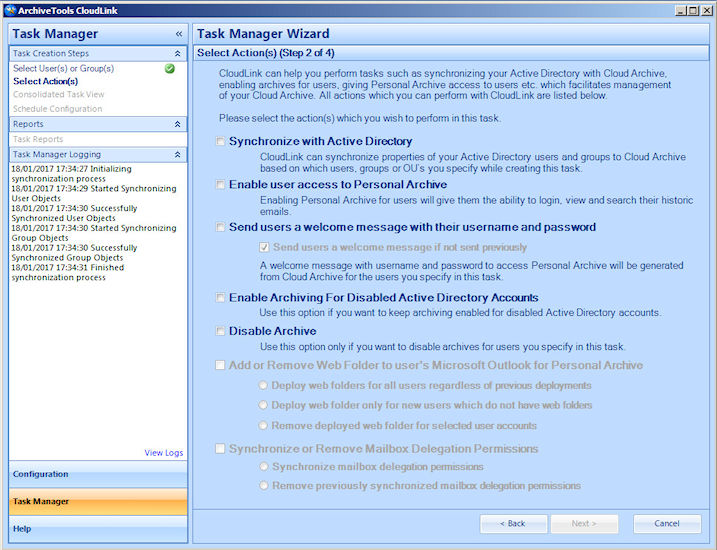
Note: The actionsEnable user access to Personal ArchiveandSend users a welcome message with their username and passwordare not available for selection unless the option to manage account provisioning remotely using CloudLink is selected in the Management Console. SeeAbout granting remote account management for CloudLink. Note: The actionsAdd or Remove Web Folder to user's Microsoft Outlook for Personal ArchiveandSynchronize or Remove Mailbox Delegation Permissionsare always unavailable for selection with a Google Sync task, since they are not applicable for Google Sync.
To select the actions for a task to perform
-
On the Select Action(s) page, choose one or more actions for the task to perform, for the users you specified:
The following table describes all the actions you can select from.
| Synchronize with Active Directory | Synchronizes Active Directory properties with Arctera Insight Archiving. |
|---|---|
| Enable user access to Personal Archive | Enables the user to access Arctera Insight Personal Archive. |
| Send users a welcome message with their username and password | Resets the password for the user's Insight Personal Archive account, and sends the new password to the user along with the user name, in a welcome message. |
| - Send users a welcome message if not sent previously | Sends the welcome message with the new password only if the task has not sent one before. |
| Note: This option is selected by default, to avoid resetting passwords and sending welcome messages to users with existing passwords. If you deselect this option for a recurrent task, the task resets the account password and sends a welcome message every time it runs. | |
| Enable Archiving for Disabled Active Directory Accounts | Enables archiving for disabled Active Directory accounts. |
| Disable Archive | Regardless of the Active Directory account status, treats the account as if it is disabled and performs the action that is selected under For user accounts disabled in Active Directory in the Additional AD Sync Options configuration step. |
| See Configuring the additional AD synchronization options . | |
| For example, if the For user accounts disabled in Active Directory option is set to Disable Arctera Insight Archiving Archiving and Login , then regardless of the Active Directory account status the task disables archiving and login to Insight Personal Archive. |
-
Click Next to save the task selections and continue to the next wizard step.
More Information
Related information