
Changing your profile password
You can change the password that you use to access Arctera Insight Management Console whenever required. If your organization uses the default password policy, your new password must be at least eight characters long. In addition, your password must include two of the following character types:
-
A number between 0 and 9
-
A lowercase letter
-
An uppercase letter
-
A non-alphanumeric character
If your organization uses an advanced password policy, your new password must meet the requirements of that policy.
Note: Changing your password for Arctera Insight Management Console also changes your password for other Arctera Insight Archiving products.
To change your password
-
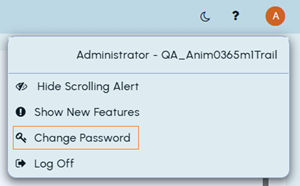
In the top-right corner of the page, click on your user profile icon.
-
Click Change Password.
-
On the Password Changepage, in theOld Password field, enter your current password.
-
In the New Password field, enter your new password.
-
In the Confirm Password field, enter your new password again.
-
Click Save.
Related information