
Provisioning the Email Continuity service for your mail servers
You must get Arctera Services and Support to provision the Email Continuity service for your company, and to give you the additional information, you need to set up Email Continuity.
To provision the Email Continuity service for your mail servers
-
Obtain a list of all the inbound domains that your mail server uses.
-
Log on to the Arctera Insight Archiving Arctera Insight Management Console .
-
In the left navigation pane, select Configuration>Services.
-
Under the Domains section, check whether all of your mail server's inbound domains are listed.
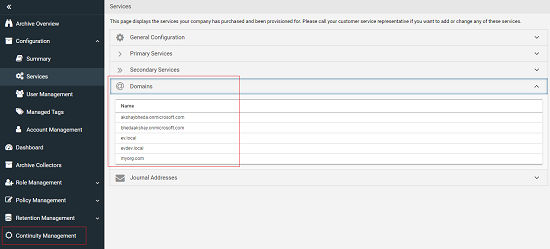
If any of the domains are not present, make a note of the missing domains.
-
Contact Arctera Services & Support and do as follows:
-
Inform Arctera Services & Support that you want to add Email Continuity as an Arctera Insight Archiving service for your organization.
-
If you found in step 4 that any of your mail server inbound domains were not configured in Arctera Insight Management Console, ask Arctera Services & Support to add the required inbound domains to your Arctera Insight Archiving company configuration.
-
Provide Arctera Services & Support with the IP address and the domain name for each mail server for which you want to enable Email Continuity. They can then provision the Email Continuity service for your company.Note: Email Continuity can be configured for only one mail server per domain.
-
From Arctera Services & Support, obtain the following information that needs to be used in the next steps:
-
The Arctera Insight Archiving Email Continuity IP ranges for your Arctera Insight Archiving instance.
-
The Arctera Insight Archiving Email Continuity mail server domain for your geographical region.
-
-
Related information