
Downloading the annotated and redacted document
After annotation or redaction, you can download document in either original format (native) or PDF format. You can choose to include or exclude annotations and redaction while downloading PDF.
To download the annotated and redacted document
-
After you annotate or redact the content or document, select the View tab.
-
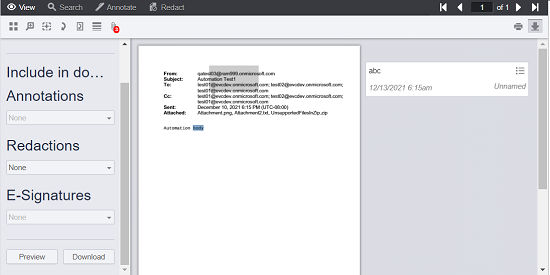
Click Download. The application displays the following dialog box.
-
Under Annotation, selectNoneto exclude annotation downloads or selectAll to include all annotations while document downloading.
-
Under Redaction, selectNoneto exclude redaction downloads or selectAll to include all redactions while document downloading.
-
To preview the document before downloading it, click Preview. After preview, you can end preview by clicking theEnd Preview button.
-
Click Download to save the document on your computer.
Related information