
About the Task Manager Welcome page and Archive User Browser in a Domino environment
The Welcome to Task Manager Wizard page shows information about the following:
-
The Domino users that you have selected for CloudLink to synchronize to Arctera Insight Archiving.
-
CloudLink tasks that you have created.
-
Summary report information about completed synchronizations.
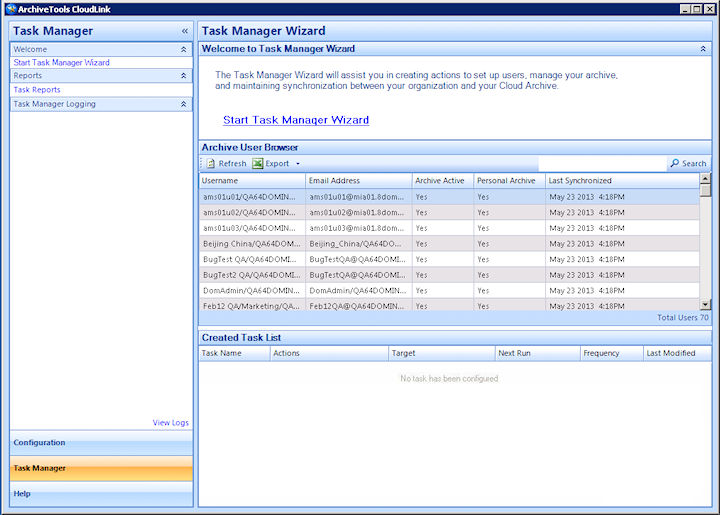
The Archive User Browser
The Archive User Browser pane shows a list of the users that you have selected for CloudLink to synchronize from Domino Directory to Arctera Insight Archiving. When you start CloudLink, CloudLink reads its local database to provide this information. To refresh this data, click Refresh on the Archive User Browser menu bar.
Note: When you create a task, CloudLink adds the users to its database as soon as you select the Domino view. The database can therefore include users for which synchronization has not yet occurred.
Table: Information shown in the Archive User Browser for Domino shows the information that the Archive User Browser displays for each user.
Related information
Table: Information shown in the Archive User Browser for Domino
| Column | Description |
|---|---|
| Username | The login name of the user. |
| Email Address | The primary email address of the user. |
| Archive Active | Yes : Archiving is set to enabled. |
| No : Archiving is set to disabled. | |
| Personal Archive | Yes : Access to Personal Archive is set to enabled. |
| No : Access to Personal Archive is set to disabled. | |
| Last Synchronized | The date and time of the last synchronization event. |
| Note: The last synchronization time can be different for different users. You get only the modified account details from the last synchronization time to optimize the cloud archive status synchronization. | |
| See Optimizing the cloud archive status synchronization . |
Note: Remember that the Archive User Browser shows information from when you started CloudLink, or from when you last refreshed the Archive User Browser.
You can export the details of the users that are listed in the Archive User Browser to a CSV (comma-separated values) file.
Created Task List
The Created Task List area lists all the tasks that currently exist. The list is empty until you create some tasks. You can manage your existing tasks from this list.
Task Manager Logging
The Task Manager Logging area posts information about synchronizations as they happen, and provides links to the task reports and the CloudLink logs.
See Viewing the task reports.