
Searching for the exact Insight Surveillance item for review
To search for the exact Insight Surveillance item
-
Browse the archives of accounts that are assigned to you. Conduct a search to filter the required items.
-
Select the item to preview its content.
-
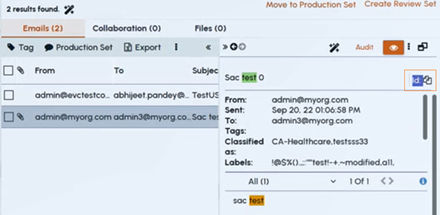
If the item originates from Insight Surveillance, its document ID appears in the preview pane, as shown in the example below.
-
Click the Id icon to copy the item ID.
-
In the Advanced Filter pane, expand the Item Id Filter , and paste the copied item Id.Note: When theItem ID Filterfacet is used, all other filter facets are cleared to allow searching for only the exact matching Item ID in the archive.
-
Click Search to view the exact item in the preview pane.
Related information