
Understanding InsightBooks dashboard
Accessing the dashboard
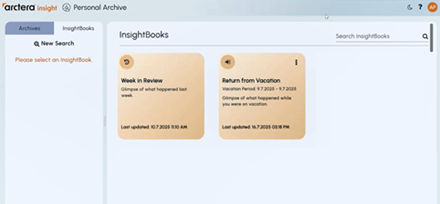
To access the InsightBooks dashboard, open the Personal Archive application and navigate to the InsightBooks tab in the left pane. If you are accessing it for the first time, the following InsightBooks are displayed by default:
-
Week in Review:
This Week in Review InsightBook automatically gathers all emails and collaboration messages received during the past week, from Monday through Sunday. It helps users quickly review recent communications and identify key discussions or updates without manually filtering content.
-
Return from Vacation:
The Return from Vacation InsightBook allows users to set a custom vacation period. When the user returns, the InsightBook displays all emails and collaboration messages received during that timeframe, making it easier to catch up on missed communications. See Setting a vacation period.
Searching InsightBooks
You can search for a specific InsightBook using the Search field in the top-right corner of the dashboard. Enter a keyword, such as the InsightBook name or a related topic, and the list filters automatically to display matching InsightBooks. This helps users quickly locate a particular collection without scrolling through the entire list.
Related information