
Finding your way around
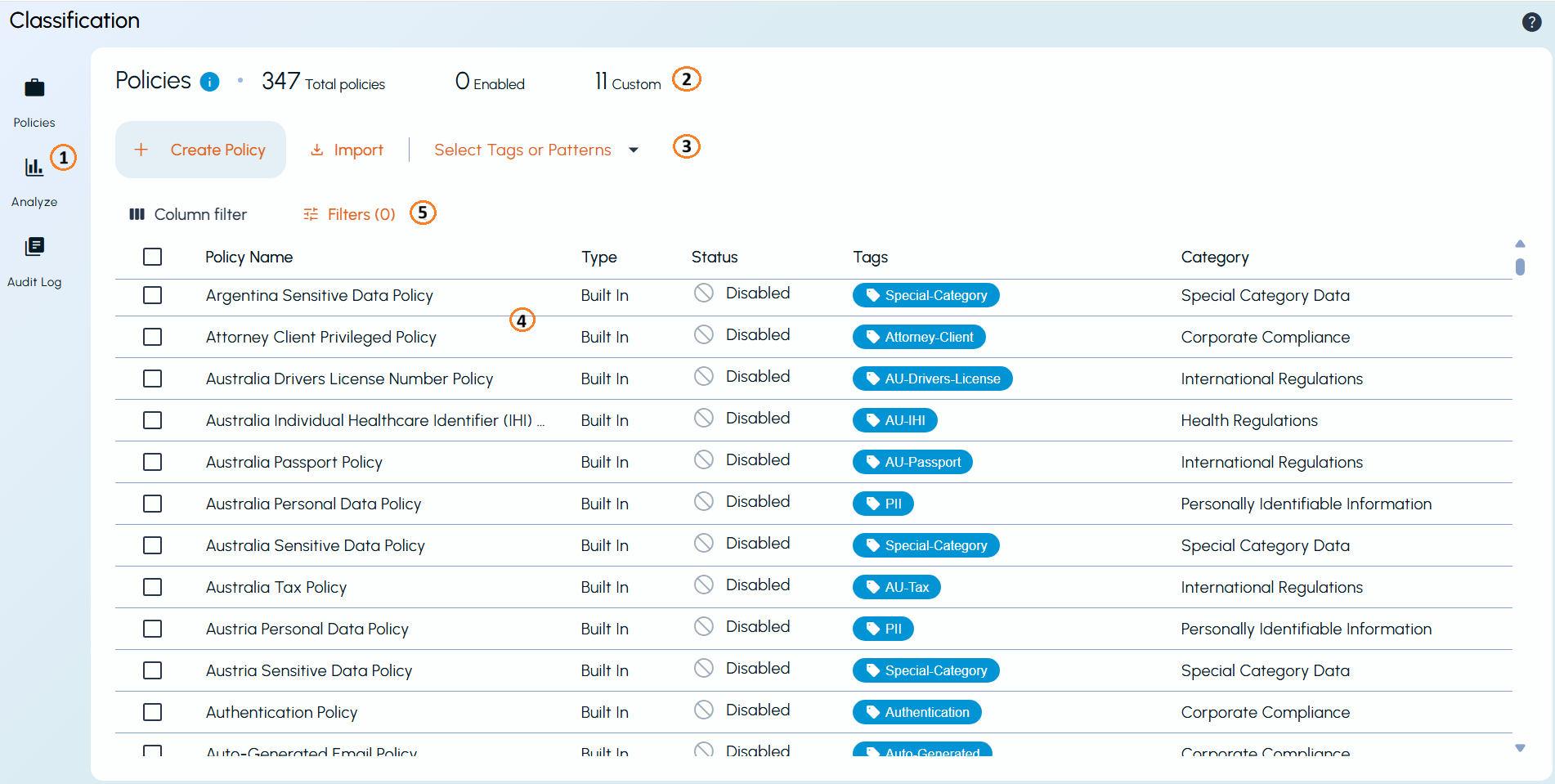
The Arctera Classification window is divided into five main areas: the navigation menu, summary, primary operations, item list, and filter panes.
-
Navigation menu: Provides access to the Quick Actions, Policies, Analyze, and Audit Log pages, and the option to return to the home page.
-
Summary: Displays summary information about the current page, such as the total number of policies, tags, or patterns, and their status.
-
Primary operations: Provides options such as Create, Import, and access to Tags or Patterns.
-
Item list: Displays the available items along with key information about each item. You can select the Actions menu (⋮) for an item to access additional actions.
-
Filter panes: Lets you search, filter, sort, and customize the items displayed in the item list. Use Column filter to choose the columns to display and Total Filters to narrow the list based on specific criteria.
The Help icon (?) in the upper-right corner provides access to What's New, the Policies and Patterns Guide, the User Guide, and product version information.
Note: Arctera Classification supports both light and dark themes. For consistency, this documentation uses the light theme.
Related information