
Exporting Compliance Report
The Compliance Export feature provides an efficient way to document your classification logic, replacing manual spreadsheet tracking with secure, audit-ready reports.
Using One-Click Documentation, you can select multiple entries from the Policies page to generate an export of the entire policy structure, including associated tags and the specific condition logic used in patterns.
To simplify management and sharing, the system generates a compressed .zip archive containing individual PDF reports for each selected policy. This helps keep documentation organized for audits involving multiple teams.
To protect document integrity, exported PDFs are secured against copying, editing, printing, and rearranging. Each report serves as an official compliance record through Official Certification, which automatically adds a watermark and copyright notice to every page.
Note: The logic for built-in policies is not included in Compliance Export reports.
To export a Compliance Report
-
On the Policies page, select the check box for one or more policies that you want to include in the report.
-
Click Compliance Report inside the action menu at the top of the item list.
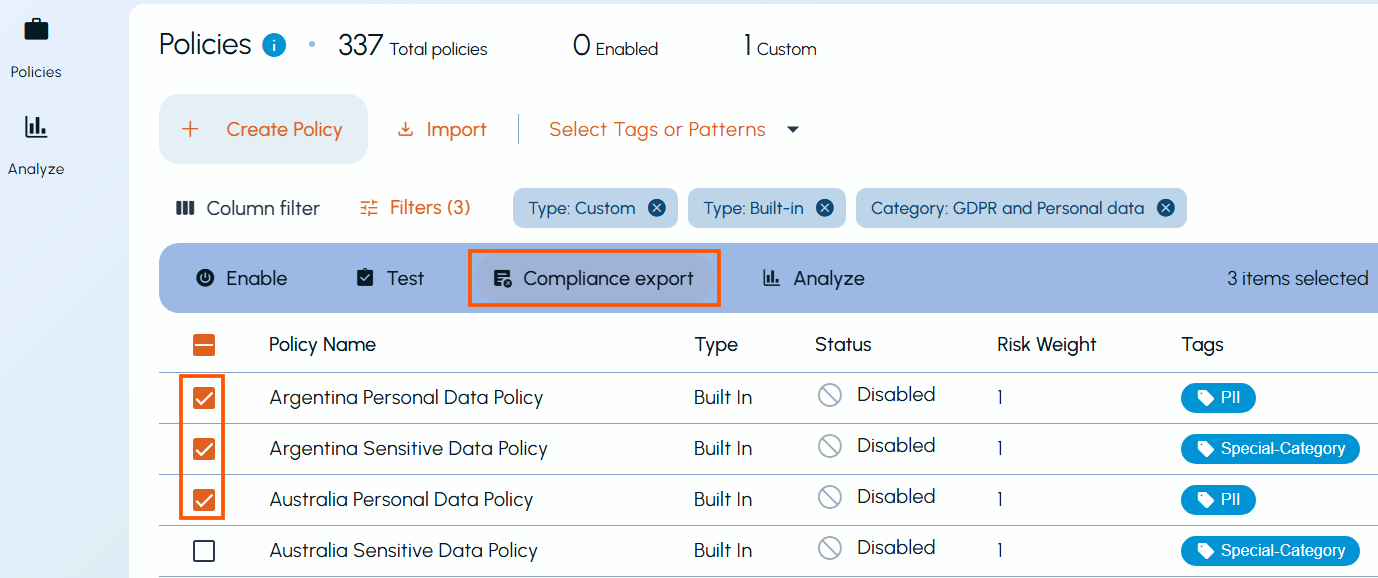
-
In the Save As dialog box, browse to the location where you want to store the file and click Save.
-
Locate the downloaded
.ziparchive and extract the files to view the individual policy reports in PDF format.You can now open the extracted PDF files to review the detailed classification logic and associated tags for each exported policy.
Related information