
Source Configuration
To configure the EWS collector:
-
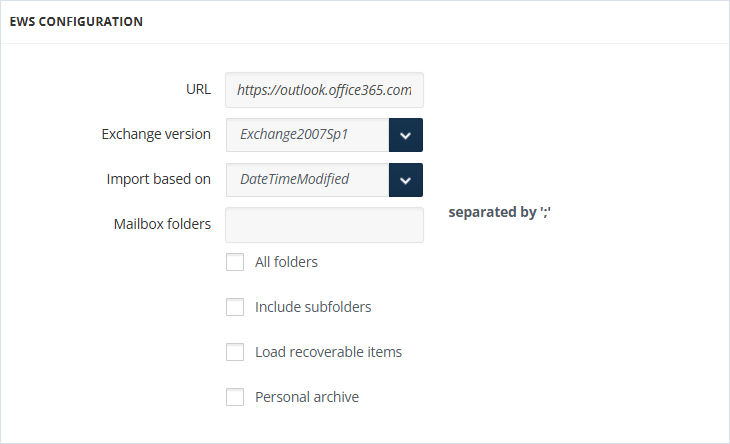
Specify the URL for the EWS collector.
-
Select the required
Exchange versionfrom the drop-down list. -
Choose if the import should be done by last modification date (DateTimeModified) or by creation date (OriginalDateTime). The cut-off date options change accordingly.
-
Fill in the Mailbox Folder from where the data should be imported. If you have more than one Mailbox Folder, separate each name with a semicolon.
-
To process data within all the folders, check All folders.
-
To process data within the subfolders of the specified mailboxes, check Include subfolders.
-
To search for the mentioned mailbox folders in the recovery route folders, check
Load recoverable itemsif the Exchange Version is not Exchange2007 Sp1. -
Enable Personal archive to process only the archived information.
-
Provide Application ID and Tenant ID.
-
Select the X.509 Certificate file.
-
Enter the X.509 Certificate password. The Certificate thumbprint field will be auto populated in case the collector was previously configured by uploading a certificate.
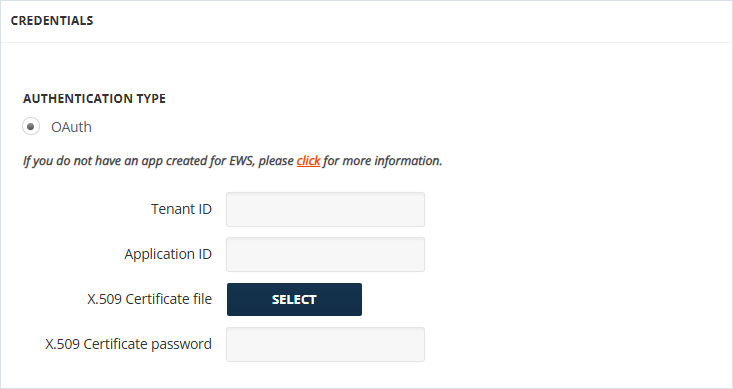 Note: For step-by-step instructions on how to getApplication IDandTenant ID, seeMicrosoft Entra ID App Creation.
 -
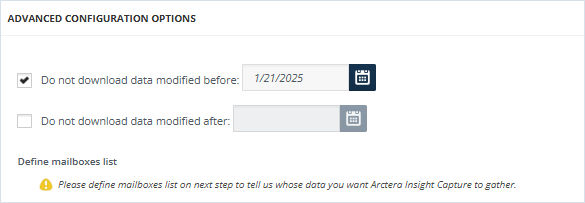
For Advanced Configuration Options, Do Not Download Data Modified/Created Before and Do Not Download Data Modified/Created After, allow cutting off data outside the set date range. If the before date is set to 08/17/2021 and the after date is set to 08/25/2021, only the data between these two dates will be downloaded. Data outside that time frame will be ignored. Note that both options can be used independently as well.
-
Select the Message Class you would like Arctera Insight Capture to import and then click Save.
A Message Class is an internal identifier that Microsoft Outlook and Microsoft Exchange utilize to locate and activate forms. There are the following Message Class types that can be imported from Exchange:
-
Message (IPM.Note)
-
Meeting Request (IPM. Schedule.Meeting.Request)
-
Meeting Cancellation (IPM.Schedule.Meeting.Canceled)
-
Appointment (IPM.Appointment)
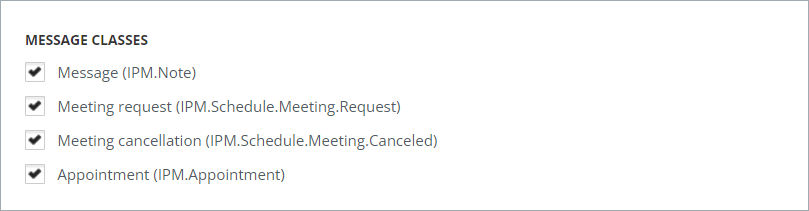
To include messages irrespective of their Message Class, select all of them.
Related information