
Source Configuration
To configure the Exchange Graph API collector:
-
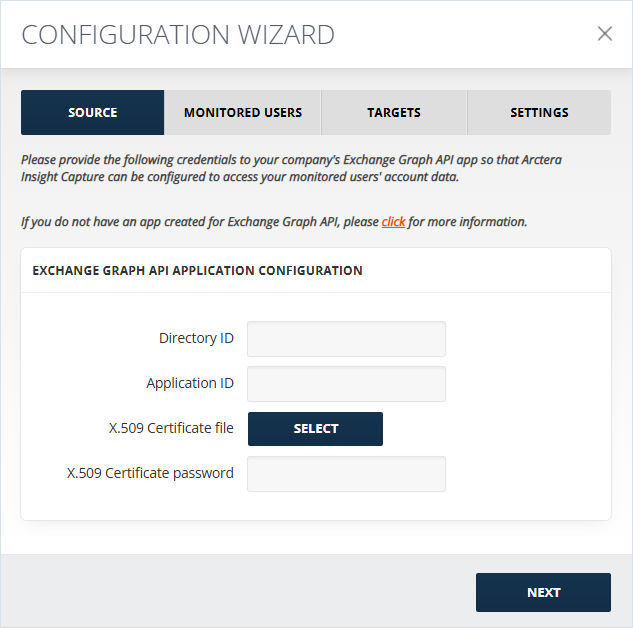
In the new window opened, add Application ID, and Application Secret/Key.
-
Select the X.509 Certificate file and enter the X.509 Certificate password. The Certificate thumbprint field will be auto populated in case the collector was previously configured by uploading a certificate.Note: You can copy theApplication IDfrom the Microsoft Entra ID > App Registrations> \<your app name\> section.
-
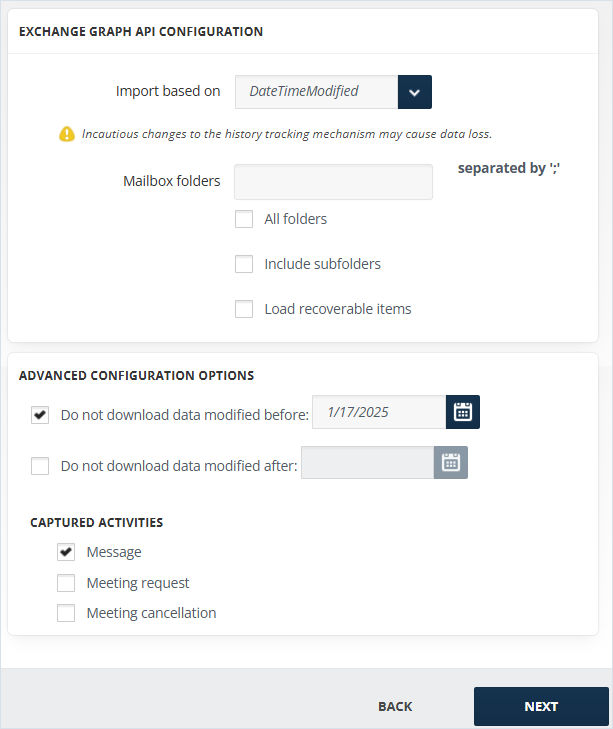
On the next screen, choose whether the import should be done by the last modification date (DateTimeModified) or by the creation date (OriginalDateTime). The cut-off date options change accordingly.
-
Fill in the Mailbox Folder from where the data should be imported. If you have more than one Mailbox Folders, separate each name with a semicolon (";").
-
Check All folders to process data within all the folders.
-
To process data within the subfolders of the specified mailboxes, check Include subfolders.
-
To search for the mentioned mailbox folders in the recovery route folders, check Load recoverable items.
-
For Advanced Configuration Options, Do Not Download Data Modified/Created Before and Do Not Download Data Modified/Created After, allow cutting off data outside the set date range. If the before date is set to 08/17/2024 and the after date is set to 08/25/2024, only the data between these two dates will be downloaded. Data outside that range will be ignored. Note that both options can be used independently as well.
-
Select the Captured Activity type you would like to import and then click Save. There are the following activities that can be imported:
-
Message
-
Meeting request
-
Meeting CancellationNote: To include messages irrespective of their type, select all of them.
-
Related information