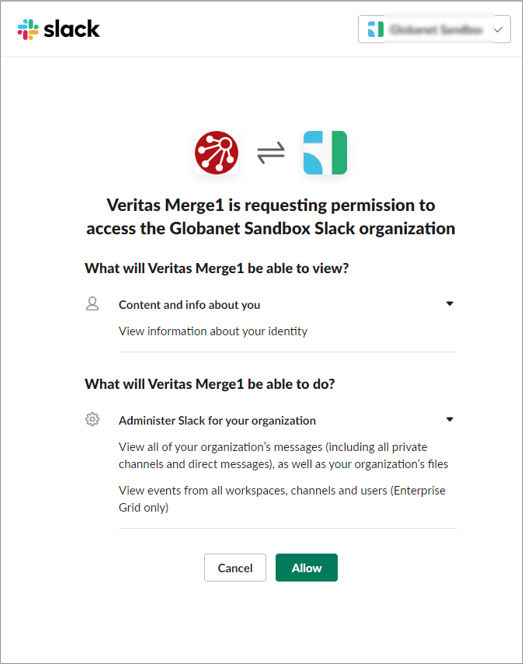
Source Configuration
To set up the Slack eDiscovery collector:
-
Log into your Slack Enterprise workspace using the organization URL. You should stay logged into your account when adding a Arctera Insight Capture collector.
-
Click Manage Organization on the upper right corner.
-
Enter the necessary workspace.
-
Confirm that the account used for configuring the collector has the necessary permissions, i.e., is either an Org. Owner or a Primary Org. Owner.Note: Org. Owner controls the highest-level security and administrative settings, but only thePrimary Org. Owner(usually the person who created the workspace) can delete it.
-
Leave the window open.
-
Go to Arctera Insight Capture and add click Add Importer.
-
Add a Name to the importer and a Description and select the collector from the collectors list.
-
After receiving a confirmation from us, contact exports@slack.com and ask to enable Discovery API for your organization.
-
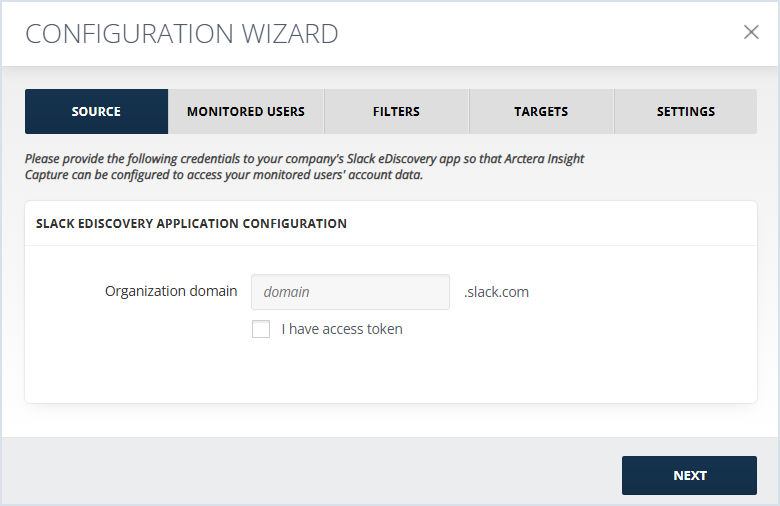
Add your Slack eDiscovery Organization URL in the Organization Domain field. If the organization domain has enterprise subdomain in it, it should be omitted from the field. For example, the domain
Arctera.enterprise.slack.comshould be filled in asArctera.slack.com. -
Click NEXT, to initialize the connection after the Discovery API is enabled. Discovery API allows using approved third-party apps (in this case Arctera Insight Capture) to export, archive, or meet other security and compliance obligations for any organization content.
-
Authorize the connection between Slack eDiscovery and Arctera Insight Capture.