
Alta Surveillance multi-tier architecture
Alta Surveillance has a two-tier architecture, which provides the ability to manage and delegate compliance responsibilities across multiple geographical, functional, and departmentally-distributed compliance departments. The following diagram illustrates this architecture:
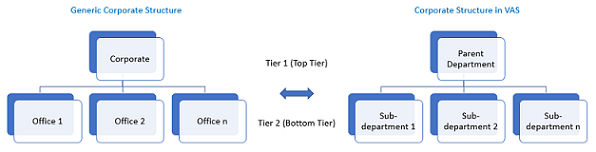
The mirroring of an organizational department can be accomplished by creating departments and sub-departments in Alta Surveillance. The parent department (top tier) is a Corporate Office tier. The sub-department (bottom tier) is an office tier in which an administrator can create as many sub-departments as necessary. This architecture enables the corporate office to distribute the items monitoring workload to the second-tier offices as required.
Within a department in Alta Surveillance, an administrator or a reviewer can:
-
Create another department for monitoring individual compliance and subsequently generate department-specific reports.
-
Create, edit, and delete reviewer and escalation reviewer accounts for an office.
-
Control whether the reviewers in an office can create hotwords (department-specific keywords or phrases) as per the compliance policy.
-
Create compliance-specific searches (immediate, scheduled, and guaranteed sample searches).
-
Monitor and review items.
-
Reassign items to an escalation reviewer for approval or rejection.
-
Export and print search results and reports for offline review or for sharing with an approved third-party organization.
Related information