
Viewing predicted labels of review items
Reviewers can view predicted labels assigned to the review items in the following ways:
-
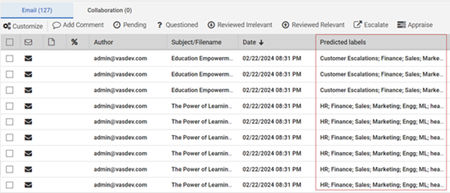
Item Grid pane: In the item grid on the Review page, access the Predicted labels column to view the predicted labels for each item. If multiple labels are predicted, they are separated by semicolon. Refer to the image below:
-
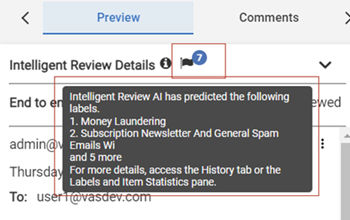
Preview pane: In the Preview pane on the Review page, hover over the flag icon (representing AI-based Label Predictions) to view a tooltip containing information about the predicted labels and groups, including their count. Refer to the image below:
-
History pane: On the Review page, access the History pane.
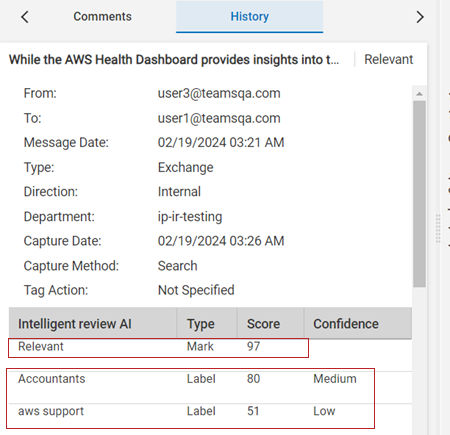
The table displays details as shown in the sample image below:
-
Intelligent Review mark as RelevantorIrrelevant and its relevancy score.
-
Labels associated to the item, its score and confidence level.
-
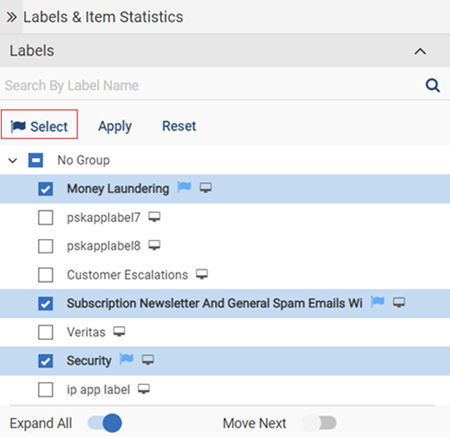
Labels and Items Statistics pane: On the Review page, access the Labels and Items Statistics pane. Expand the Labels section and click Select to conveniently select only the predicted labels. It does not select the labels from the single choice group. Refer to the sample image below.
Related information