
Restricting users to use hotwords in searches
As an administrator, you can restrict users - who have permissions for research folders - from using hotwords while creating and running searches. For that, you need to disable the following department-level permissions:
-
Search Capture: This permission allows users to create searches. If this permission is not enabled then users cannot view the Search tab.
-
Show Hotwords in Search: This permission allows users to view and use the Hotwords buttons under the Search Terms section.Note: For users with theSearch Capturepermission is enabled, theShow Hotwords in Searchpermission is enabled by default.
If the Search Capture and the Show Hotwords in Search permissions are enabled, users can view the Hotwords buttons under the Search Terms section. Users can click Hotwords to select existing hotwords and provide new hotwords for searches. See the sample screenshot below.
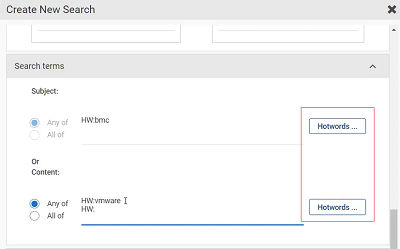
If the Search Capturepermission is enabled and theShow Hotwords in Search permission is disabled, users can create and view the searches, but cannot view the Hotwords button under the Search Terms section. See the sample screenshot below.
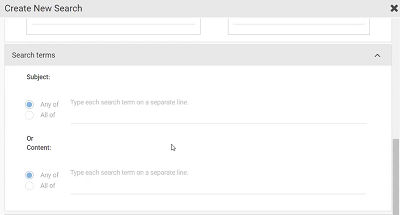
Therefore, to restrict the users to view and use the Hotwords, you must enable the Search Capturepermission and disable theShow Hotwords in Search permission.
To enable or disable these permissions, See Editing user roles and permissions.
Related information