
About departments
The mirroring of organizational department can be accomplished by creating departments and sub-departments in Alta Surveillance. The parent department (top tier) is a Corporate Office tier. The sub-department (bottom tier) is an office tier in which, an administrator can create as many sub-departments as necessary. This architecture enables the corporate office to distribute the items monitoring workload to the second-tier offices as required.
Figure: A sample departmental structure in Alta Surveillance
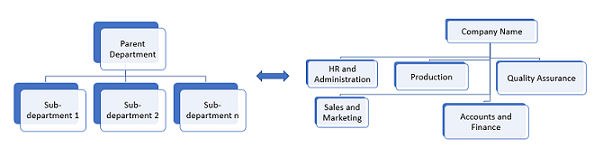
Departments allow for the organization of monitored employees, the configuration of department-wide monitoring policies, and capture and review of monitored employees' archived communication items via random sampling and searches. Administrators can configure individual monitoring policies for each department and sub-department. Alta Surveillance lets you organize monitored employees into departments that reflect the structure of your company. For example, an administrator can create departments that are called Marketing, Sales, Engineering and so on. Employees can be added to the appropriate departments. Reviewers can review items of these departments and the nested departments.
Related information