
Exporting a search summary report for emails
To export a search summary report for emails during case review:
-
On the eDiscovery tab, click Cases.
-
Search for and select the case in which you want to search emails.
-
The selected Case_Name node appears below Cases.
-
Click New Search to create a new search. Else, expand Research Sets or Review Sets to select existing search.You can access existing saved searches of the selected case from the Review Set and Research Set nodes. Alternatively, you can click New Search, specify a new criteria in the Advanced Search or the Query Search option to search for new emails for review.After performing a new search or accessing the existing searches from review set and research sets, the application displays the filtered emails, collaboration messages, and files in the details pane.
-
On the Emails tab, click the More Actions icon, and click Export Report.Note: The following sample image is specific to a search in Review Sets. If you select the search from Research Sets, the application do not show the Review Status and the Message Legal Hold options on the action bar.The application downloads the summary report (.xlsx) of the emails within the search as a zipped (.zip) folder. A sample report is shown below. The report comprises of two sheets.
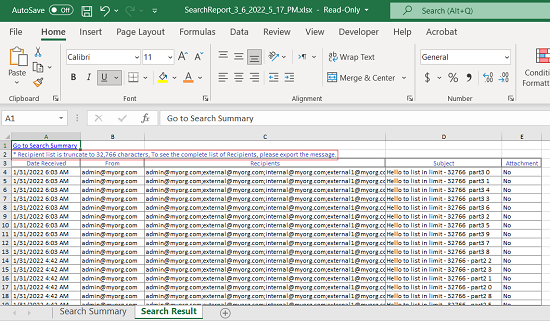 The Search Summary sheet displays details such as Search Parameters and Custodians.The Search Result sheet displays details such as Date Received, From, Recipients, Subject, and Attachments. The recipient column in this summary report includes recipients mentioned in the To, CC, and BCC fields. If the list of recipients is longer than 32766 characters, the application truncates the list. The report displays a note that - Recipient list is truncate to 32,766 characters, To see the complete list of Recipients, please export the message. In such scenario, to view the complete list of recipients, you need to export the individual message.Note: If you select a search from Review Sets, and select any filter option and click Apply, the Export Report option remains disabled.
Related information