
Viewing AI Feature Summary of cases
To view AI Feature summary of a case:
-
On the eDiscovery tab, click Cases.A list of cases is displayed.
-
Search for and select the case. The case-specific nodes appears in the left navigation pane.
-
Click Summary to open the Case Summary page.
-
Scroll down to the AI Features Summary section.Refer to the sample image below.
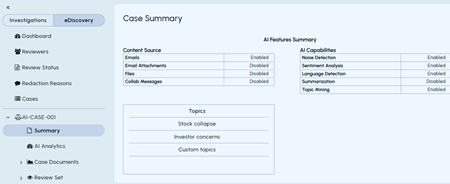 The details about enabled and disabled content sources, AI capabilities, and the topics used for the case.
Related information