
Viewing AI status and configuration of cases
You can verify whether a case is AI-enabled and view its AI configuration without opening the case.
To view AI status and configuration of cases:
-
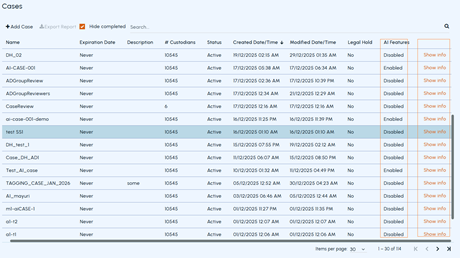
In the left navigation pane, on the eDiscovery tab, select Cases.A list of available cases appears.
-
Refer to the AI Features column.
-
If the AI Feature was enabled during case creation, the case is marked as Enabled in the column.
-
If the AI Feature was disabled during case creation, the case is marked as Disabled in the column.
-
-
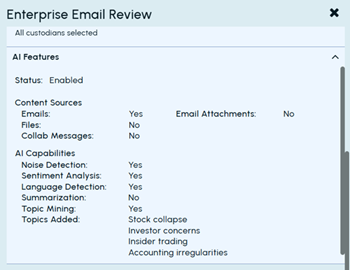
To view the detailed AI configuration of an AI-enabled case, click Show info in the row for the case.A detailed view opens and displays the following information:
-
AI Feature status
-
Selected content sources
-
Enabled AI capabilities
-
Topics configured for the case
Related information