
Searching emails exchanged among specific custodians
While performing a new search, the Search Between Custodians option allows you to retrieve the emails that are exchanged exclusively among selected custodians. Any additional internal or external participants are excluded.
Note: This feature is disabled by default. To enable it, request your system administrator to contact Arctera Support.
Before you use this feature, you must be familiar with the following facts. This feature:
-
is available in both Advanced Search and Query Search modes.
-
supports searching for email items only and does not include collaboration messages or files.
-
allows you to select minimum two to maximum 10 custodians.
-
eliminates the need to manually look up or enter individual email addresses or aliases.
To search emails exchanged among specified custodians:
-
Do one of the following as needed:
-
On the Investigations tab, select My Mailbox > New Search or Managed Accounts > New Search.
-
On the eDiscovery tab, select Archive Search > New Search.
-
-
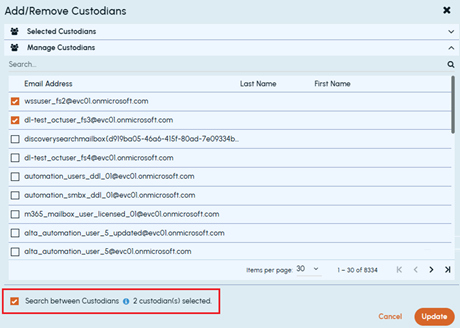
On the Advanced Search tab, under Filters, select the Custom option. The Manage button appears. Click Manage to open the Add/Remove Custodians pop-up as shown in the sample image below.
-
Select the Search Between Custodians option provided in the bottom on the pop-up.
-
Expand Manage Custodians and select the custodians required for this search.Note: Select minimum two to maximum 10 custodians as required. These custodians are listed under the Selected Custodians section.
-
Click Update to add these selected custodians as a search criterion and close the pop-up.Note: Do not select any additional criteria if you want to refine this search in Previous Searches or Search Log later.
-
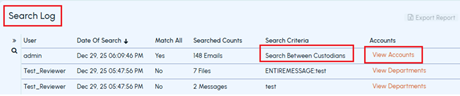
Click Search.After performing a search, if you had selected only the Search Between Custodians option and not specified any additional search criteria, the Search Log,Previous Searches, and Case History display the search criteria as Search Between Custodians.You can view selected custodians from both Investigations and eDiscovery tabs.
-
In Investigations, open Previous Searches or Search Log.
-
In eDiscovery, open Previous Searches.
The Search Criteria column shows Search Between Custodians as the applied criteria for the search. Refer to the sample images below.
-
-
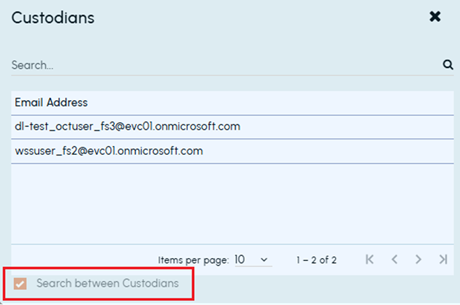
Click View Accounts in the same row.The application opens a pop-up to show the selected custodians. Refer to the sample images below.
 When you export the report for such searches with criteria as Search Between Custodians, the exported report shows the details as shown in the sample report image below.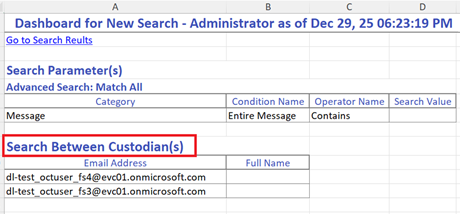
Related information