
Working with Audio-Video files
Arctera eDiscovery supports managing the archived audio-video files. The audio-video files can be collected from the Audio-Video collectors if these services are enabled for you.
The currently supported formats are as follows:
-
Video Formats: MP4, MOV, WebM, MPEG-4, and OGG
-
Audio Formats: MP3, WAV, OGG, AAC, and WebM
After executing a search, the audio-video files are listed under the Files tab. When you select the audio-video file, its details are displayed in the File Metadata pane.
The AI Transcription of the audio-video content appears. Unlike other file formats, you cannot directly view the audio or video files in the native format in the File Metadata pane.
Expand the Labels section to view the labels applied to the file.
To view the audio-video file in its native format:
-
Search for and select the file, and do any of the following:
-
Click the Download icon to save the file on your local computer.
-
Click the Native viewer icon available in the top-right corner of the File Metadata pane.
-
The selected file opens in a separate window in its native format.
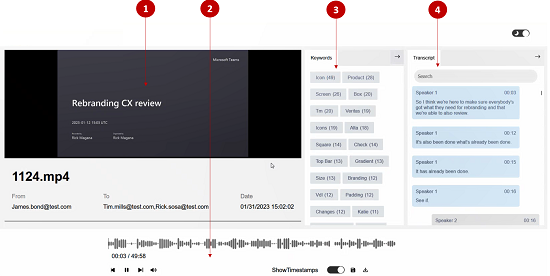
Related information
1\. Native view
This panel displays the audio-video file in its original format.
2\. Control panel
This panel provides options to rewind, forward, pause, and control audio level of the file. In addition, it provides options to download, save, and view/hide time stamps.
3\. Keywords
This panel lists the keywords and the exact count of those keywords in the audio-video content. Click the keyword to navigate to the respective content in the audio-video file and play from that point onwards.
4\. AI Transcript
This panel displays the AI transcript of the audio-video content. to navigate to the respective content in the audio-video file and play from that point onwards.
Like other files, you can apply tags and labels to the audio-video files. You can move these files to production sets and export to the intended user. Only the AI transcripts of these files are exportable in PDF format. You can apply annotations and redactions to these PDF files for review purposes. Refer to the sample image of exported AI transcript file.