
Exporting a search summary report for collaboration messages
To export a search summary report for collaboration messages:
-
On the Investigation tab, select the search for which you want to export a summary report.
-
Click New Search to create a new search. Else, expand On-going Searches or Standard Searches to select existing search.
-
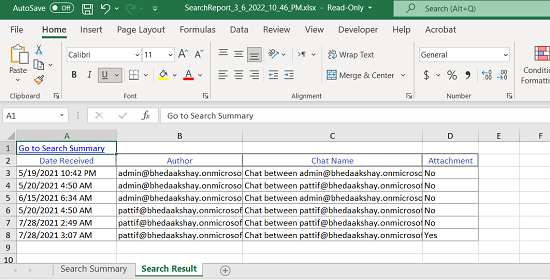
On the Collaboration tab, and click Export Report.The application downloads the summary report (.xlsx) of the collaboration messages within search as a zipped (.zip) folder. A sample report is shown below. The report comprises of two sheets.
Related information
Note
-
Search Summary: This sheet displays details such as Search Parameters and Custodians.
-
Search Result: This sheet displays details such as Date Received, Author, Chat Names (list of people involved in chat), and Attachments.
-
The Chat Name column displays the email addresses of message recipients involved in a chat. This column supports up to 100 characters; any text beyond this limit is truncated in the exported report.