
Searching tables, lists, and reports
Quick Search provides a fast way to search tables and reports in Arctera eDiscovery. For some of the more complex tables and reports Criteria Search is also available. Criteria Search enables you to search within specific table columns.
Note: Quick Search and Criteria Search do not support phrase search, Boolean operators, proximity search, or wildcard search. Searches are not case-sensitive.
To search tables, lists, and reports:
-
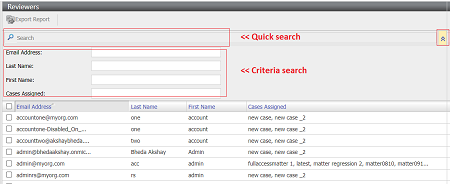
In Arctera eDiscovery browse to the page that contains the table, list or report that you want to search.The Quick Search interface is visible.If a Criteria Search is available in addition to the Quick Search, an Expand icon is present at the end of Search box, as shown here on the Reviewers node:
-
To perform a Quick Search, enter a search term in the Search box. Note the following:
-
In most cases the search begins as soon as you enter the text.
-
The search is performed on the most significant column of the table, such as the email address, the case name, the user, the export name, the search criteria, or the after value.
-
Search terms can consist of complete or partial words. Quick Search does not support phrase search, Boolean operators, proximity search, or wildcard search.
-
Searches are not case-sensitive.
-
-
On pages that support Criteria Search you can perform a search on specific table criteria. Criteria Search is available on the following pages:
-
Investigations tab > Managed Accounts > Accounts
-
eDiscovery tab > Administration > Reviewers
-
eDiscovery tab > Cases > Case Name > Case History
-
Alerts tab > Policy Alert
To perform a Criteria Search, click the Expand icon at the end of the Quick Search box, the Criteria Search option is displayed.Enter your search terms in one or more of the search boxes. Search terms can consist of complete and partial words. Searches are not case-sensitive. Phrase search, Boolean operators, proximity search, and wildcard search are not supported.Arctera eDiscovery returns the search results as you enter the criteria. As you add more criteria the search is filtered on those criteria. -
Related information