About legal hold notifications
A legal hold is a process used to preserve information that may be required for legal proceedings, investigations, or regulatory matters. When a legal hold is issued, custodians are notified to preserve the relevant information until the hold is released.
The Legal Hold Notifications feature in Arctera eDiscovery provides a centralized workflow to manage the complete legal hold lifecycle, from creating legal holds and sending preservation notices to tracking notice delivery, acknowledgments, reminders, escalations, survey responses, and notice events. This workflow replaces manual email and spreadsheet-based legal hold processes. Each legal hold progresses through the Active,Released, and Archived stages of its lifecycle.
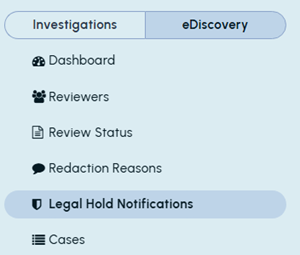
Access to this feature is restricted to eDiscovery Administrators. Users with this role can access the Legal Hold Notifications node under the eDiscovery tab.
Using this feature, eDiscovery Administrators can:
-
-
Include survey or questionnaire questions in custodian notices.
-
Track notice delivery and custodian acknowledgments.
-
View and export survey responses and notice events.
-
Resend notices to custodians who have not acknowledged them.
-
This feature uses OTP-protected acknowledgment links to help verify that custodians have acknowledged their legal hold notices. Custodian acknowledgment helps confirm that the preservation instruction was received and understood. If a notice is not acknowledged, administrators can identify outstanding responses and follow up with custodians before the acknowledgment link expires. Each acknowledgment link remains valid for 30 days from the time the notification is sent.
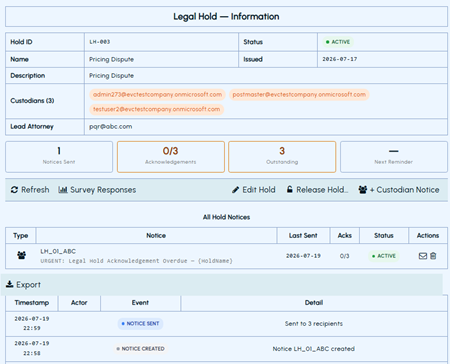
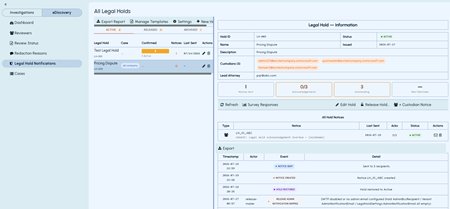
The Legal Hold Notifications workspace includes the navigation pane, the All Legal Holds page, and the Legal Hold — Information pane. The following sample images show the main areas of the Legal Hold Notifications workspace, including where to access the feature, view legal holds, and review details for a selected legal hold and available actions.
Entire workspace:
Legal Hold Notifications option in the eDiscovery navigation pane:
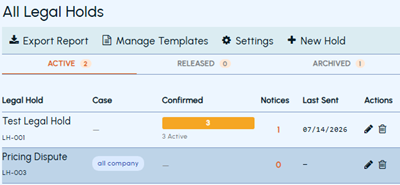
All Legal Holds page showing legal holds by status:
Legal Hold — Information pane showing details and actions for the selected legal hold: