
Using proximity searches
Proximity search lets you find items (like emails or collaboration messages) where specific search words are within a defined distance from each other. You can use proximity operators to specify the distance between these search terms in your queries.
The following are some important points to remember when using proximity searches:
-
Word Limit: Insight Surveillance restricts the proximity word count to a maximum of 49 words.
-
Stop Words: Results may include stop words, but these are not counted in the proximity word count.
To understand proximity search, here are a few examples:
Asterisk (*):
This operator lets you specify a distance between the search terms.
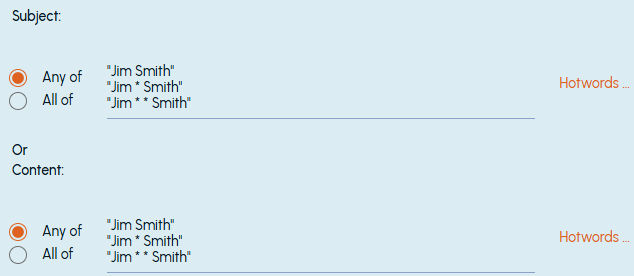
To search for two words where the maximum distance between these words is only one word, use a single Asterisk. For example, "JimSmith" To search for two words where the maximum distance between these words is two words, use two Asterisk symbols. For example, "Jim * Smith".
 |
|---|
This would return results for any email, document, or attachment containing variations of the name, such as "Jim Smith," "Jim Martin Smith," "Jim M. Smith" ("Jim Smith"), or "Jim James Martin Smith" ("Jim * Smith").
Diacritics:
This Unicode operator allows you to specify language-specific queries. For example, searching for "éléphant" retrieves only the French variant, so analyze your search criteria for non-English emails with special characters.
Question Mark:
This operator retrieves items with variations of a search term. It represents one or more characters, allowing you to search for singular or plural forms by placing a question mark at the end of the terms.
For example, if you're searching for the words "Market," "Investment," or "Risk" and want to include their plural forms in the results, you can use the syntax shown in the sample image below.
 |
|---|
This would return results for any email, document, or attachment containing the words "Market," "Markets," "Investment," "Investments," "Risk," or "Risks" in the body text (Market OR Markets OR Investment OR Investments OR Risk OR Risks).
Negation conditions:
This operator (minus sign) searches for items in which the first specified term appears outside the context that you have defined with the second term. It allows to extend the hotword length to a maximum of 2,000 characters.
Add the keyword AND before the first negation term, ensuring there is a space before and after AND. For example,
SearchAND -"search criteria", test AND -"test crit?ria" -"te?st vas", "search criteria" AND -"search criteria Bloomberg"
Related information