
Pinning and unpinning departments to view review status
You can pin (bookmark) up to five departments to quickly view their review status when required. You can drill down for further details in a specific area. If the pinned departments are no longer required, you can unpin them.
To pin and unpin departments
-
In the left navigation pane, click Dashboard.
-
On the Review Statuswizard, clickPin/Unpin Departments.
-
In the Pin/Unpin Departments dialog box, search for the department that you want to pin or unpin, then and click the pin icon adjacent to it.
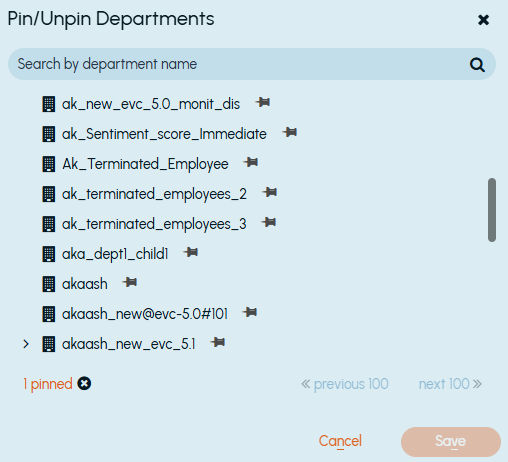
The icon color and direction of the pin icon changes to indicate that the department is selected. Use the navigation arrows to go to the previous and next pages to select departments. The count of the departments selected for pin or unpin is displayed at the bottom of the dialog box.
-
Click Save.
If the departments selected for pinning, these departments appear on the Review Statuswizard. If the departments selected for unpinning, these departments disappear from theReview Status wizard.
Related information