
Setting up new search schedules
Note: You must have theManage Schedulespermission to set up new search schedules. By default, users with the application role ofApp Rule Adminhave this permission.
To set up a new search schedule
-
In the left navigation pane, click Configuration.
-
Click Search Schedules.
-
Click New Schedule.
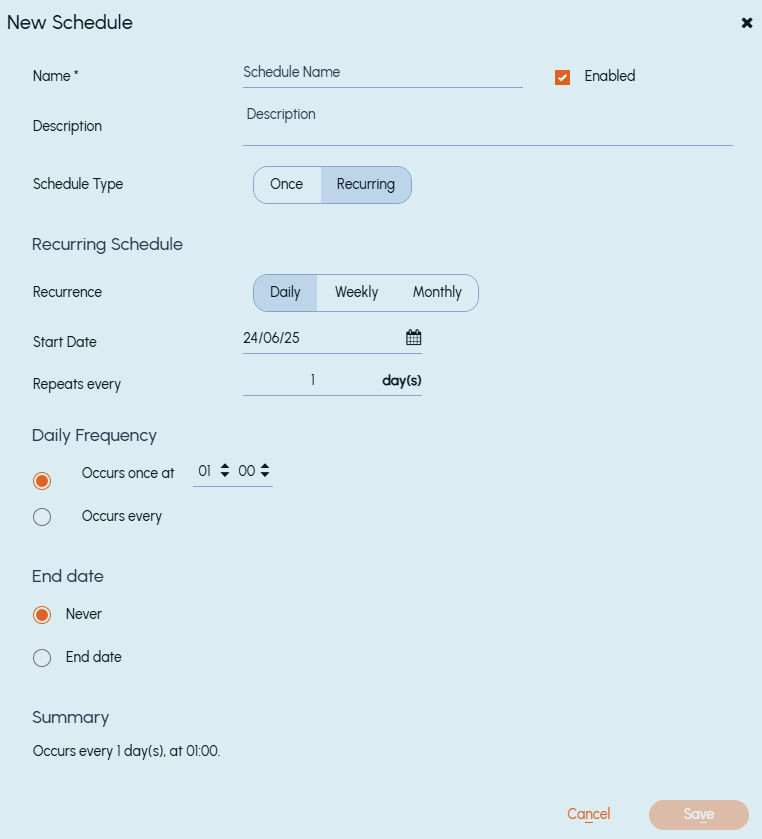
The New Schedule dialog box appears.
 |
|---|
-
In the NameandDescription fields, type a unique name and an optional description for the schedule respectively.Note: The search schedule name can contain up to 50 characters and cannot be edited once created. The description can contain up to 250 characters.
-
Select the Enable check box so that the schedule is available for selection when you define the criteria for a new search.
-
Select the required schedule type. The options are as follows:
Schedule type Description Once Causes any searches that use this schedule to run only once, at the time that you set in the schedule. Recurring Causes any searches that use this schedule to run automatically at the interval that you specify in the schedule. -
Click Save.
Related information