
Accessing InsightBooks
You can access InsightBooks that either you created or that others shared with you. The InsightBooks Collection page lets you access the default InsightBooks and search the a specific InsightBook from the collection.
To access and search InsightBooks:
-
In the left navigation pane, select InsightBooks.The InsightBooks Collection page appears. When you access the collection for the first time, the following InsightBooks are available by default:
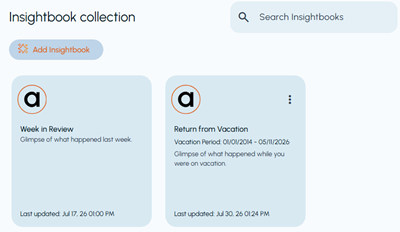
Default InsightBook Description Week in Review Automatically collects emails and collaboration messages received during the previous week, from Monday through Sunday. It helps you review recent communications and identify important discussions or updates without manually filtering individual items. Return from Vacation Collects emails and collaboration messages received during a vacation period that you specify. When you return, it provides a consolidated summary of communications received while you were away, helping you identify important or urgent items before reviewing individual messages. See Setting a vacation period. -
In the Search InsightBooks field, enter the InsightBook name or a related keyword.The collection is filtered to display matching InsightBooks.
-
Select the required InsightBook from the filtered results.