
Unsubscribing InsightBooks
Only the user with whom an InsightBook is shared can choose to unsubscribe it. This action removes the shared InsightBook from their list, but it remains available to other users and the author.
To unsubscribe an InsightBook:
-
In the left navigation pane, select InsightBooks.The InsightBooks Collection page appears.
-
Locate the InsightBook that is shared with you but you want to unsubscribe it.
-
Click the More options icon (kebab icon) on the InsightBook card, and then select Unsubscribe.
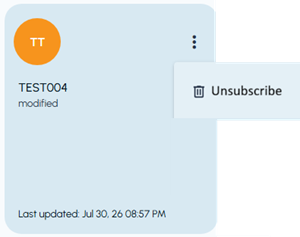 The confirmation dialog box appears.
-
Click Yes to unsubscribe the shared InsightBook, or click No to abort unsubscribing it.A notification is displayed to confirm that the InsightBook is unsubscribed successfully.