
Setting a vacation period
You can configure a vacation period in the Return from Vacation InsightBook before you leave. When you return, this InsightBook provides a consolidated summary of the emails and collaboration messages received during that period. It lets you identify important or urgent conversations, decisions, and follow-up actions before reviewing and responding to individual items.
To set a vacation period:
-
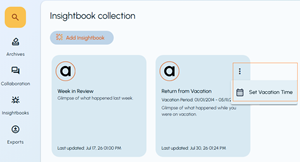
In the left navigation pane, select InsightBooks.The InsightBooks Collection page appears.
-
Locate the Return from Vacation InsightBook.
-
Click the More options icon (kebab icon) on the InsightBook card, and then select Set Vacation Time.
-
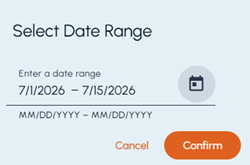
Specify the start and end dates of your vacation period.
-
Click Confirm.