
Sharing InsightBooks
You can share an InsightBook with other users to provide them access to the same collection of emails, collaboration messages, and analysis. The shared InsightBook appears in the recipients' InsightBooks Collection, while the original creator remains its owner. Recipients can view notes associated with the shared InsightBook unless those notes are marked as private. Only the note-author can delete a shared note or change its privacy setting.
To share an InsightBook:
-
In the left navigation pane, select InsightBooks.The InsightBooks Collection page appears.
-
Locate the InsightBook you want to share.
-
Click the More options icon (kebab icon) on the InsightBook card, and then select Share.
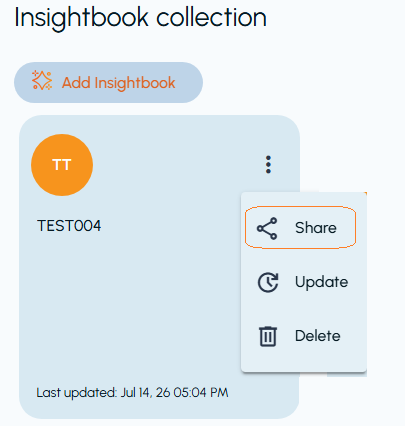 The Select Names: To share InsightBook with dialog box appears.
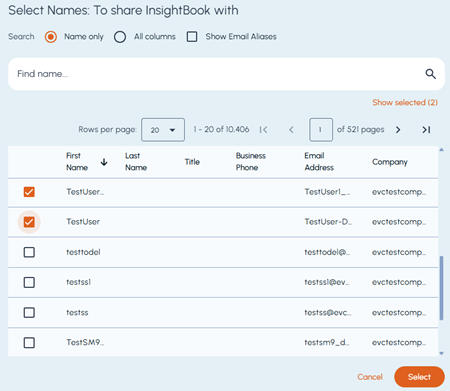
Field Description Search field Lets you enter a name or other user information and click the Search icon to find matching users based on the selected search option. Name only Limits the search to the First Name and Last Name columns. All columns Searches information from the search field across all columns displayed in the user list. Show Email Aliases Displays email aliases in the user list and includes them when searching across all columns. Show selected Displays only the selected users. The number in parentheses indicates the total number of selected users. The option changes to Show all, which you can click to display both selected and unselected users. Pagination controls Let you specify the number of rows displayed per page, move between pages, and view the current range and total number of users. -
Click Select.The confirmation dialog box appears.
-
Click Yes to share the InsightBook with the selected users, or click No to abort sharing.