
Mail Filter
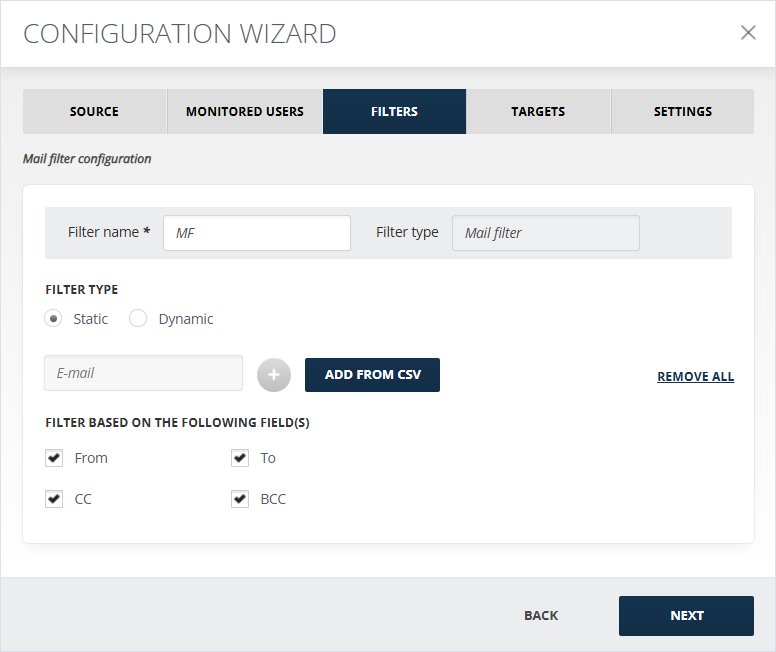
Using Mail Filter, you can send the imported data to different targets based on the email addresses in the TO, FROM, CC, and BCC fields of the imported messages, depending on the fields you specify in the filter settings. The mail filtering in Arctera Capture can be static and dynamic.
Static Filter allows uploading a CSV file with email addresses that will be used for filtering. Click Add from CSV to browse for the necessary list for filtering. The CSV file should include only email addresses that should be used for filtering.
Dynamic Filter is used to specify email addresses dynamically from Entra ID. This means, that if any changes are applied to the user list in the server or in the CSV file, the filter settings are refreshed, and values are retrieved newly each time the Importer is run.
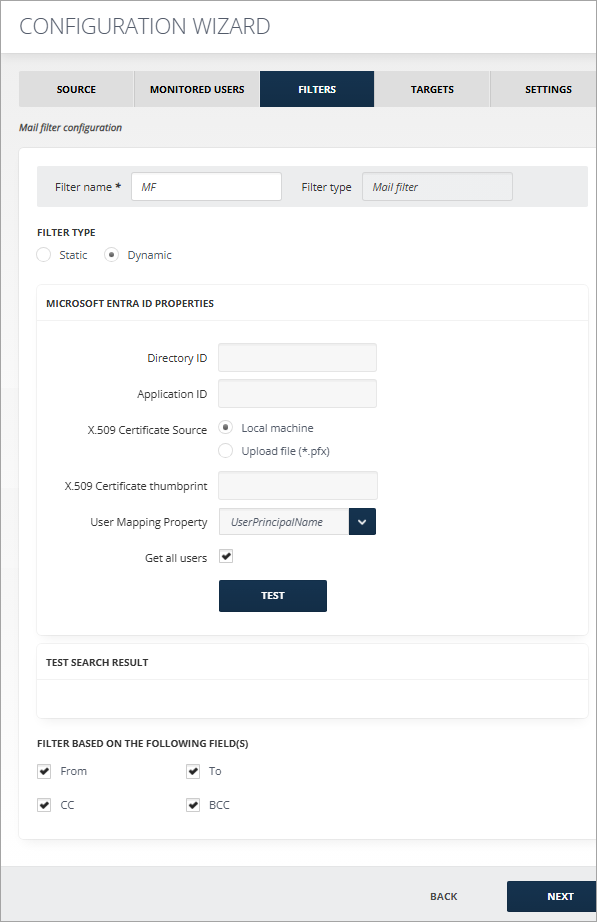
To configure the Microsoft Entra ID section:
-
Specify Application ID and Directory ID. For more details on how to create an app in Microsoft Entra and grant the permissions, see Microsoft Entra App Creation and Microsoft Entra App Permissions below.
-
Select the X.509 Certificate Source — Local machine or Upload file (*.pfx) — and enter the X.509 Certificate thumbprint.
-
Select User Mapping Property form the drop-down list.Note: User Principal Name always exists.
-
Enable Get all users checkbox to get all users.
-
Click Test to verify the Microsoft Entra ID connection.
Related information