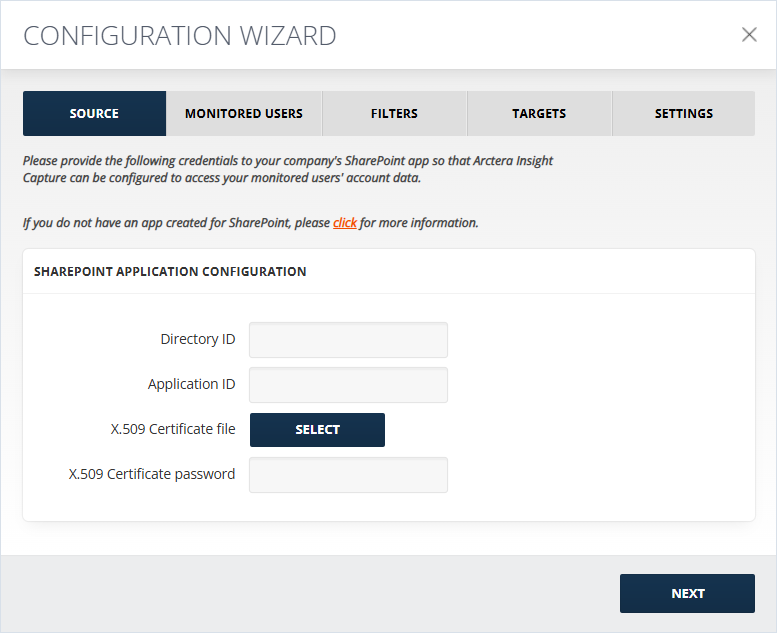
Source Configuration
To set up the collector:
-
Provide Directory ID.
You can copy the Application ID from the Entra ID > App Registrations > \<your app name\> section.
-
Select the X.509 Certificate file.
-
Enter the X.509 Certificate password. The Certificate thumbprint field will be auto populated in case the collector was previously configured by uploading a certificate.
For attachments configuration:
-
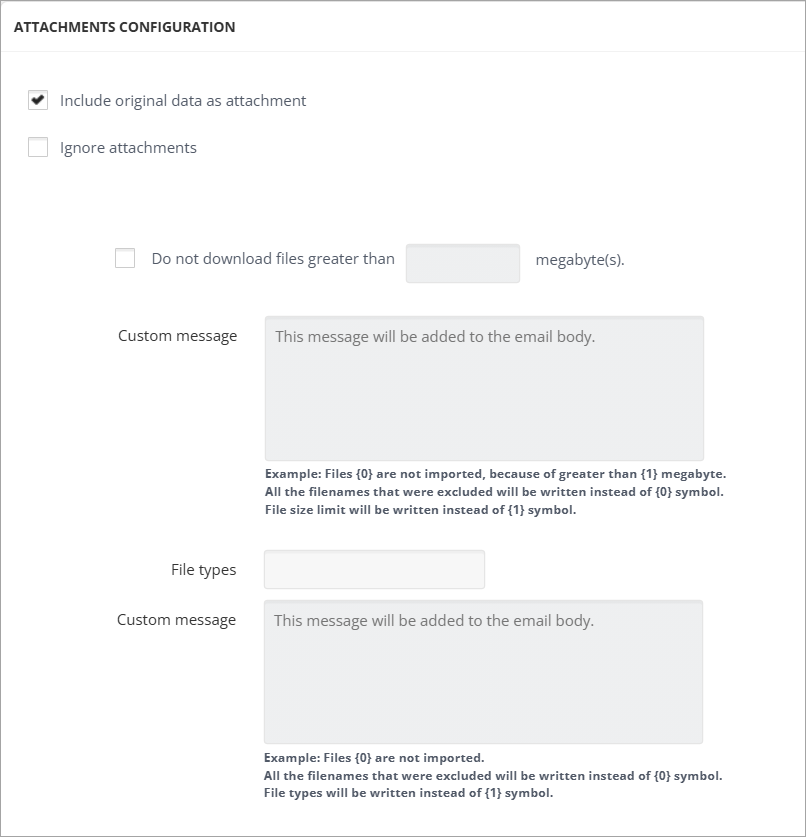
Include original data as attachment: If checked, the message original data is attached to the output file.Note: Not applicable to the EV Folder target.
-
Ignore attachments: If checked, all the attachments are excluded from the message enhancing the collector performance. Each message will contain info and the link to the excluded attachment.
-
When Do not download files greater than X megabyte(s) is selected, the files bigger than the filled-in number of megabytes are not downloaded. In the Custom Message field, a text for those excluded files can be specified. For example, "Files {0} are not imported, because they are greater than {1} megabytes". {0} is used to add the name of the file and {1} is used to add the number of megabytes specified above.
-
In the File Types field, the types of files that should not be downloaded can be specified in the following format: e.g., .txt | .xml. The vertical bar is used to separate the file types.