
Attachment Validation
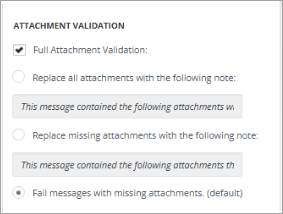
Arctera Capture enables you to develop customized notes for attachment validation. The default setting is Fail Messages with missing Attachments, as a result of which the messages that do not have attachments are failed and can be viewed under the Reports. Note that Advanced Processing should not be selected for this to happen.
When Full Attachment Validation is enabled, the entire source (file group) is quarantined in case the attachment of a message is missing or corrupted, i.e., the selection under Attachment Validation (Fail messages with missing attachments) will be ignored.
If you select the Replace all the attachments with the following note and input your custom note, all the attachments to the messages will not be processed and in their place the input note will be added to the message.
If you select the Replace missing attachments with the following note and input your custom note, all the missing attachments of the messages will not be processed, and you will see only the custom message that you have entered.
Related information