
Adding or removing email addresses for reconciliation report notifications
Administrators on the customer side can now enable reconciliation report notifications and manage recipient email addresses directly through the management console, eliminating the need for support team intervention.
To add or remove email addresses for reconciliation report notifications:
-
In the left navigation pane, select Reports and Notifications>Notifications
-
Select the Reconciliation Report Notifications tab, and click Edit
-
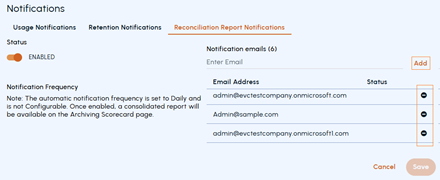
Under Notification emails , do the following as needed:
-
To add an address, enter the email address and click Add.
-
To remove an email address, select the email address and click the Remove icon in the corresponding row.
-
-
Click Save More Information
Related information