
Managing InsightBooks permissions
Before you configure InsightBook permissions for a user account, you need to enable the Personal Archive InsightBooks option. See Configuring archive options.
To configure InsightBooks permissions:
-
In the left navigation pane, click Configuration>Account Management
-
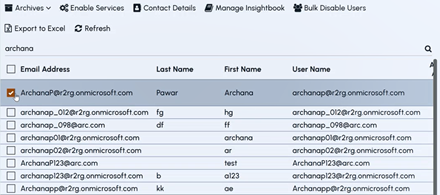
Search for and select a user account to which you want to grant the manage InsightBooks permission.
-
On the action bar, click Manage InsightBooks The Manage InsightBooks pop-up appears.
-
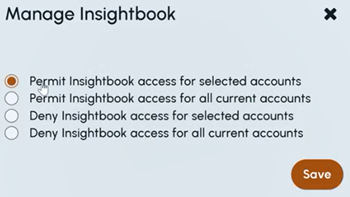
Select one of the following options, as needed.
-
Permit InsightBook access for selected accounts — To grant InsightBook access only to the accounts you manually choose.
-
Permit InsightBook access for all current accounts — To grant InsightBook access to all existing accounts in the organization.
-
Deny InsightBook access for selected accounts — To block InsightBook access only for the accounts you manually choose.
-
Deny InsightBook access for all current accounts — To block InsightBook access for all existing accounts in the system.
-
-
Click Save