
Generating an AI units trend report
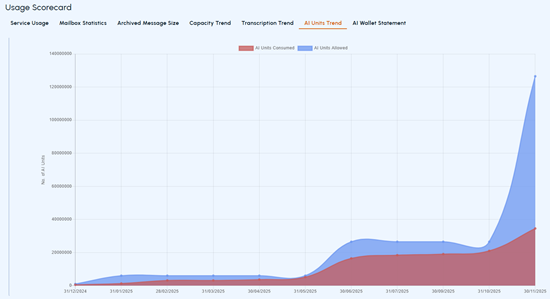
The AI Units Trend report provides the allowed and consumed AI unit details for customers or their partners in graphical or chart format. This report helps customers or their partners understand their proximity to the licensed (allowed) and actually used AI Units limit. By reviewing this report, they can proactively make decisions.
Note: Data can take up to 24 hours to refresh once you've enabled or disabled mailboxes.
To generate a AI units trend report:
-
In the left navigation pane, select Reports and Notifications>Usage
-
On the User Scorecard page, select the AI Units Trend tab.
-
Select a predefined duration, or select Custom if you want to specify a start and end date for the report.
-
Select the predefined frequency (Daily, Weekly, Monthly, Quarterly, or Yearly.)
-
Click ApplyThe application generates a report indicating the licensed (allowed) and actually utilized AI Units limit by the customer or their partners, as shown in the sample image below.
-
If required, switch between the Line Chart and Bar Chart display options to view chart in the report.
-
To export the report in EXCEL, PDF, CSV, or WORD format, click the Export icon.
Related information