
Configuring archive options
Administrator can enable or disable the archive options to configure archiving policies and AI-driven capabilities for the Arctera Unified Platform applications subscribed by a customer.
To configure archive options:
-
In the left navigation pane, select Policy Management > Archive Options
-
Click Edit to configure the required features.Refer to the details in the table below.
Archive Option Description Manage Your Own Encryption Keys (MYOK) This option is informational only and cannot be configured through this interface. This configuration is available only during initial provisioning, before any data is stored.See Configuring the Manage Your Own Keys (MYOK) Feature . or contact Arctera support Email Direction Specifies which types of emails are archived. By default, all message types are selected. Select the email direction, as needed.• Inbound Emails - Select this option to enable archiving email messages sent to addresses within your domain from external domains.• Outbound Emails - Select this option to enable archiving email messages sent from addresses within your domain to external domains.• Internal Emails - Select this option to enable archiving email messages exchanged between addresses within your domain. Archiving Actions Determines whether the Arctera Personal Archive users can send, reply, forward, print, or save messages.• Send, Reply, and Forward - Select this option to allow users to send, reply to, and forward messages in Arctera Personal Archive.• Save - Select this option to allow users to save archived messages to your computer from Arctera Personal Archive.• Print - Select this option to allow users to print archived messages from Arctera Personal Archive. Time Zone and Date Format Specifies the time zone and date format.• Personal Time Zone - Select the appropriate archiving time zone.• Default Company Time Zone - Select the default time zone for your company.• Date Format - Select the default date format for your company. Mobile Web Access Determines which permissions to be enabled for Mobile Web Access users.• Status - Select this option to enable or disable Personal Archive Mobile Web Access permission.• Automatically grant Personal Archive Mobile Web Access permission for new accounts - Select this option to grant Personal Archive Mobile Web Access permission for new archive accounts when you create them manually in Arctera Management Console. Note: This option does not apply to archive accounts that are created through CloudLink or Exchange Online Sync.• Send, Reply and Forward from Personal Archive Mobile Web Access - Select this option to enable the Send , Reply , and Forward options in Personal Archive Mobile Web Access.To use this feature, Arctera Personal Archive administrator requires the Personal Archive Mobile Web Access permission. You can set it for the Arctera Personal Archive administrator role.See Editing Personal Archive Mobile Web Access permission for existing archive accounts Privileged Delete Determines whether permanent deletion of archived items is enabled for Arctera Personal Archive and Arctera eDiscovery. This option is disabled by default for both products and must be explicitly enabled by an administrator.When enabled, deleted items are permanently removed from the archive for all users and cannot be restored. Items that are on legal hold or protected by WORM are not deleted.To enable the Privileged Delete permission in eDiscovery:Turn on the eDiscovery option under Policy Management > Archive Options. Enabling this option does not automatically grant delete access to all eDiscovery users. Delete access is role-based and must be granted to an eDiscovery Administrator.To grant the required permission to the role, go to Role Management > Administrator Role > Built-in Roles > eDiscovery Administrator, and then select the Privileged Delete check box.To assign the role to an account, go to Role Management > Assign Accounts, and select the required account. From the Role drop-down list, select Administrator. Expand Built-in Roles, and then select the eDiscovery Administrator check box.To enable the Privileged Delete permission in Personal Archive:Turn on the Personal Archive option under Policy Management > Archive Options. Enabling this option grants permanent delete access to all Personal Archive users. You must acknowledge the warning before enabling the option. Emails deleted from Personal Archive are permanently removed for all users and are no longer searchable by eDiscovery administrators in Arctera eDiscovery.Because deletion is irreversible and affects all users, enable this option only for controlled and governed use. For more information about configuring permissions for built-in roles, see Modifying the built-in roles. View Delegate Archives Folder Structure Determines if the ability to view delegate archive folders in Arctera Personal Archive to be enabled or disabled.Note: To use this feature, Folder Sync must be enabled for the account and delegate archives. For delegate archives with Folder Sync enabled, user would be able to see the folder structure on selection in Arctera Personal Archive. If you have over 4,000 synchronized monitored and delegate archive folders, the loading time in theActive Folders tab might take up to five minutes. The delegate archive folder structure keeps synchronizing even though theView Delegate Archive Folder Structure option in Management Console is enabled or disabled. When the delegate account users logs in to Arctera Personal Archive, they can view their folder structure. Export to Azure private storage location Determines if the Arctera eDiscovery data can be exported to the Azure location. Toggle the switch to enable or disable this feature.If the status is set to Enabled , the Create new Storage Account button is displayed in Arctera eDiscovery. Click Create new Storage Account to allow a customer to create an Azure storage account during exporting items from Arctera eDiscovery.Note: This is an on-demand feature and is enabled for the customers only after their request for it. It allows customers to create their private storage account and get a storage account SAS URL to work with their storage account. You can configure the status (Enabled or Disabled) and the retention period of this feature from the database only. If the status is set toDisabled, you cannot see theCreate new Storage Account button. You can generate only one Azure storage account per customer. After creating a storage account, theCreate new Storage Account button gets disabled. If you hover over the disabled button, theStorage account is already created tooltip is displayed. Contact Arctera Customer Service representative to enable it. OCR Status Determines whether the Optical Character Recognition (OCR) service is enabled or disabled for customers and displays all the supported file types like .pdf,.jpeg,.png, and more.Toggle to enable or disable this feature in Management Console, Arctera eDiscovery, and Arctera Personal Archive.If the status is set to Enabled , customers can extract text from scanned documents, images, or non-editable files, converting them into searchable and editable formats archived in Management Console, Arctera eDiscovery, and Arctera Personal Archive.Note: This feature is now visible as a read-only section, allowing customers to verify the service activation status. Customers must contact Arctera Support to activate or deactivate the service.Show Display Name Determines whether the Show Display Name service configured for users.Toggle to enable or disable viewing the display names of the sender and recipient instead of only email addresses in Arctera eDiscovery, Arctera Personal Archive, and Arctera Personal Archive Mobile Web Applications. AI Features > eDiscovery InsightAI This feature is available to customers only if the Arctera eDiscovery primary service is subscribed by them.Toggle to enable or disable this option to view the InsightAI feature in Arctera eDiscovery.If the status is set to Enabled , users can efficiently analyze and manage documents by receiving instant summaries, extracting key topics, and performing sentiment analysis across various content types like emails, collaboration messages, and files. users can also query specific documents or search results, customize analysis preferences, and monitor resource usage with AI Wallet.If the status is set to Disabled , users cannot access InsightAI services. AI Features > Personal Archive InsightBooks This feature is available to customers only if the Arctera eDiscovery primary service is subscribed by them.Toggle to enable or disable this option to view the InsightBooks feature in Arctera Personal Archive.If the status is set to Enabled , users can create, view, and manage InsightBooks, and use GenAI to analyze emails and collaboration content. They can also share InsightBooks with other users and monitor resource usage with AI Wallet.If the status is set to Disabled , customers cannot access InsightBooks services. AI Features > eDiscovery Translation This feature is available to customers only if the Arctera eDiscovery primary service is subscribed by them.Toggle to enable or disable this option to view the Translation feature in Arctera eDiscovery.If the status is set to Enabled , users can view the Translate button and manage the translation of email content, collaboration messages, and files. All changes to the eDiscovery Translation option are audited and can be reviewed on the Logs page.If the status is set to Disabled , customers cannot access translation services. AI Features > Surveillance Translation This feature is available to customers only if the Arctera Surveillance primary service is subscribed by them.Toggle to enable or disable this option to view the Translation feature in Arctera Surveillance.If the status is set to Enabled , users can view the Translate button and manage the translation of email content. All changes to the Surveillance Translation option are audited and can be reviewed on the Logs page.If the status is set to Disabled , customers cannot access translation services. Show Item ID Filter Determines whether the Show Item ID Filter service is configured for users. It allows users to locate a single email using its unique, encrypted Item ID.If the status is set to Enabled , the display name appears alongside the email address, providing clearer identification.In the Arctera Personal Archive application, the archive list shows the display name for each archive. If the display name is not available, the first name and last name are shown. If neither is present, the email address is displayed instead. Enable Folder Search For Personal Archive 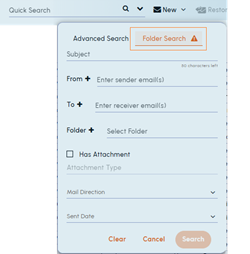 Determines whether the Enable Folder Search For Personal Archive service is configured for customer/tenant.If the status is set to Enabled , the Folder Search tab appears in Arctera Personal Archive as shown in the sample image below.
Enable Collaboration View For Personal Archive 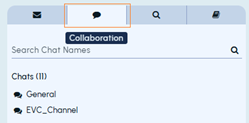 Determines whether the Enable Collaboration View for Personal Archive service is configured for customer/tenant.If the status is set to Enabled , and collaboration tools such as Microsoft Teams, Slack, or other supported platforms are integrated for a user account, then the users can view the Collaboration tab in the left pane of Arctera Personal Archive as shown in the sample image below.
 -
Click Save
Related information