Managing custom roles
Custom roles are user-defined roles that provide a customizable set of permissions when built-in roles do not meet specific requirements. You can create custom roles and configure their permissions as needed. You can also rename or delete them.
Creating a custom role
-
In the left navigation pane, click Role Management > Administration Roles
-
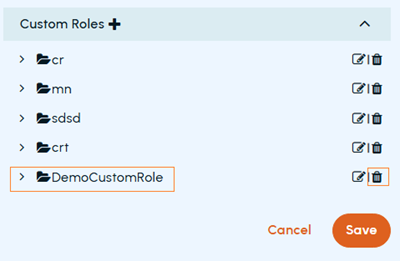
In the Custom Roles section, click the plus icon.
-
In the blank text box, enter a unique name for this role, and click Save
-
Expand the custom role to view available permissions, select the check boxes for the permissions you want to add, and click Save
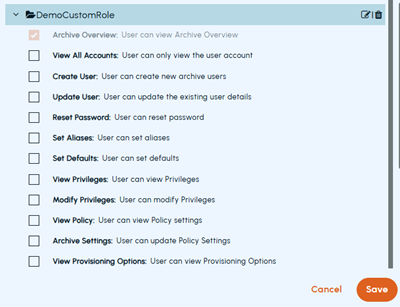 The following table lists the permissions available for custom roles.
Permission Description Archive Overview Allows the user to view the Archive Overview, which displays a summary of archive statistics and activity. View All Accounts Allows the user to view all archive user accounts. Create User Allows the user to create new archive user accounts. Update User Allows the user to update existing archive user account details. Reset Password Allows the user to reset passwords for archive user accounts. Set Aliases Allows the user to set email aliases for archive user accounts. Set Defaults Allows the user to configure default settings for archive accounts. View Privileges Allows the user to view privileges assigned to archive user accounts. Modify Privileges Allows the user to modify privileges assigned to archive user accounts. View Policy Allows the user to view policy settings. Archive Settings Allows the user to update policy settings for archiving. View Provisioning Options Allows the user to view provisioning options. Set Provisioning Options Allows the user to configure provisioning options. View Retention Settings Allows the user to view retention settings. Modify Retention Settings Allows the user to modify retention settings. Delete Retention Tag Allows the user to delete retention tags. Authentication Management Allows the user to update authentication settings. View Archive Collections Allows the user to view archive collections. Edit Archive Collections Allows the user to edit archive collections. Classification Privileges Allows the user to edit and enable Veritas Information Classifier policies. Manage Notifications Allows the user to view and configure usage notifications. Bloomberg Settings Allows the user to update Bloomberg settings. Import Data Allows the user to import PST files from the Import Data self-service portal. Manage Exclusion Texts Allows the user to view, modify, and import exclusion texts. Manage API Keys Allows a privileged administrator to create and manage tenant-scope API applications. Manage Certificates Allows the user to manage tenant certificates. View Certificates Allows the user to view tenant certificates. Manage Personal Archive Export Allows the user to manage Personal Archive export operations. View Reports Allows the user to view the Reports, Usage, Logs, Capture, and Notifications screens. Privileged Delete Allows permanent deletion of archived items in Arctera eDiscovery. Deleted items cannot be restored. The Privileged Delete option under Policy Management > Archive Options must also be enabled for this permission to take effect.
Renaming a custom role
-
In the left navigation pane, click Role Management > Administration Roles
-
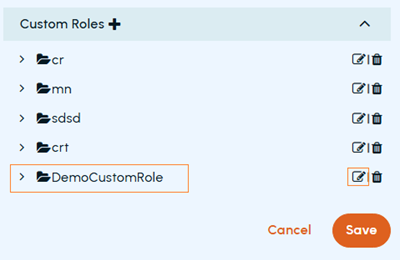
In the Custom Roles section, click the Edit icon in the corresponding row.
Deleting a custom role
-
In the left navigation pane, click Role Management > Administration Roles
-
In the Custom Roles section, click the Delete icon in the corresponding row.