
Configuring the Google Collection archive
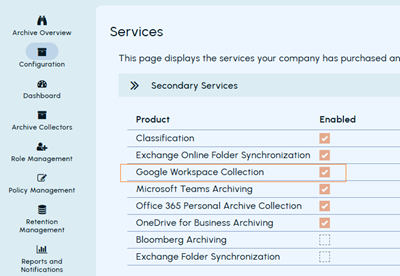
Before you begin, ensure that the Google Workspace Collection secondary service is enabled for you. To verify this, in the Arctera Management Console, navigate to Configuration > Services, and check if the Google Workspace Collection secondary service is selected.
After you configure the Google Collection archive, the system automatically creates separate collector instances based on the selected source types (Gmail, Chat, or Drive). Each instance uses a corresponding suffix: -Gmail, -Chat, or -Drive.
To configure the Google Collection archive:
-
In the left navigation pane, select Archive Collectors
-
On the Archive Collector page, click Add collector to view available collector cards.Note: At the time of adding the first collector, the Add collector button appears in the middle of the screen. If one or more collectors are already added, the Add collector option appears on the top right-hand corner. If you select an unsupported collector, it disables the Configure button to prevent its configuration.
-
Select the Google Collection card and click Configure
-
In the Add Importer pop-up, specify a unique name and description for this archive collector.The Google Workspace Account Provisioning page appears.
-
In the Impersonate User Email field, specify the email address of a Google Workspace user who has access to the data you want to archive.The collector uses this account to access and collect data from Google Workspace. The service account does not access data directly; it uses this user account's permissions to perform the collection.
-
Click Upload Certificate to select an existing certificate (JSON file) or upload a new one. The certificate contains the service account credentials required to securely connect to Google Workspace.
-
Click Test Connection to validate the configuration.Note: You must test the connection before saving to verify that the API client has the required scopes configured. The Save option remains disabled until the connection test is successful. For more information about creating a Google Cloud service account and configuring domain-wide delegation, follow the instructions provided in the user interface.
-
Upon successful connection, click Save
-
Verify that the configured Google Collection archive collector appears in the collectors list.In the left navigation pane, go to Archive Collectors. In the Search field, enter the collector name and confirm that it is listed.
Related information